Tractivvity · Feature guide · Gran Turismo 7
Benchmarks
Reference laps — ours and yours — and the one report in Tractivvity that reads a lap before you drive it.
A lap worth chasing
Most of Tractivvity looks at laps you have driven. Benchmarks are the other direction: a lap somebody else drove, or one of your own you have set aside as the standard, kept so you can measure against it and study it.
There are two kinds and they behave differently, so it is worth knowing which you are looking at.
| Curated | Your own | |
|---|---|---|
| Who drove it | The fastest drivers in the world | You |
| Where it comes from | We capture P1 replays off the Sport Mode daily race leaderboards, usually on a Monday | You record it yourself from a GT7 replay |
| Who can see it | Everyone, on the Benchmarks page | Only you |
| Leaderboards | Neither kind counts. A benchmark is a reference, not a result — it never touches records, personal bests or the weekly challenge | |
Curated benchmarks BASIC
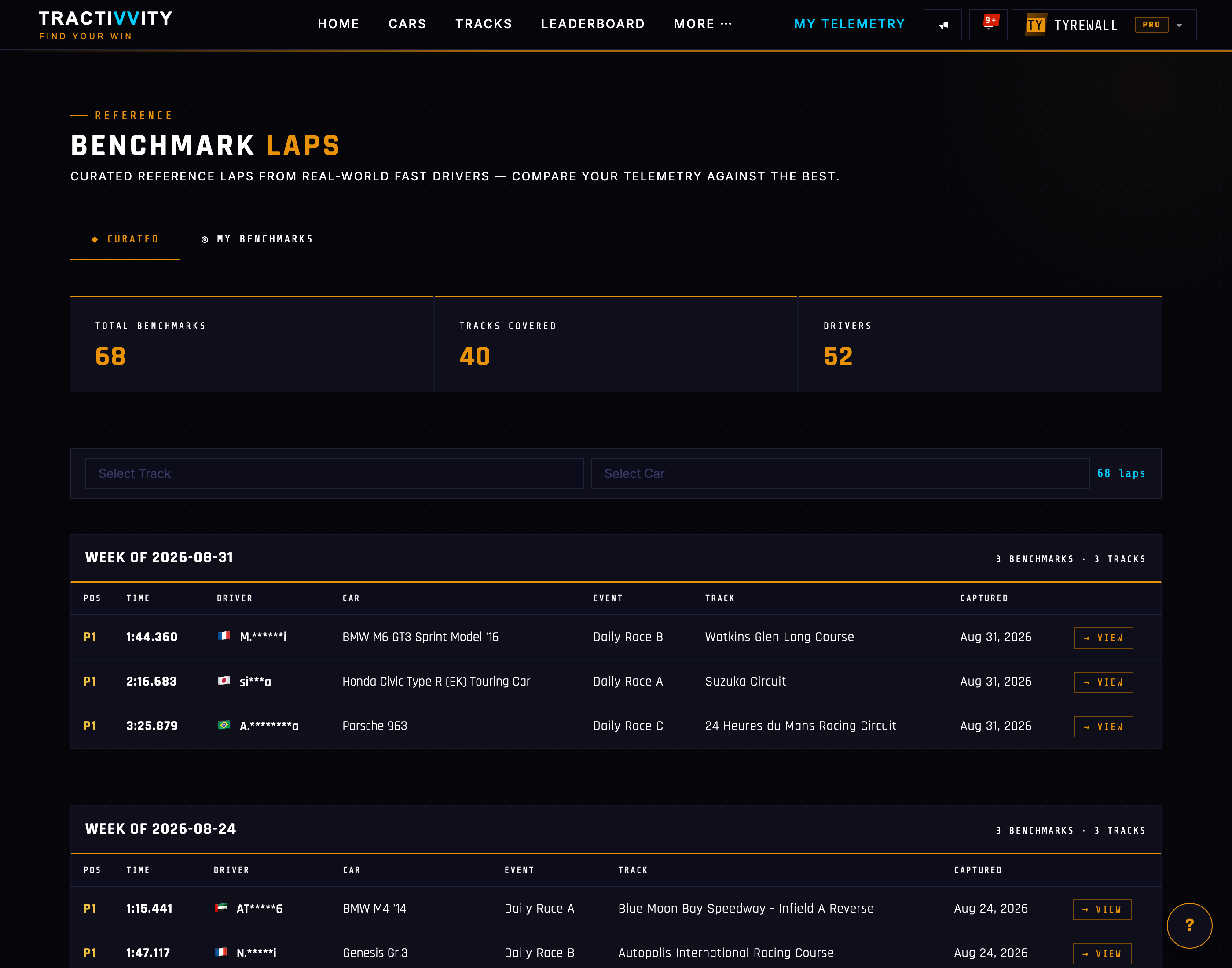
These are the reference laps we go and get. Every week, the fastest lap from each daily race gets captured from the replay and published here, so you can open the telemetry of a lap that won a global daily and look at what the driver actually did with their hands and feet.
Filter by track and car to find the combination you are running, and the page tells you how many benchmarks exist, how many tracks they cover, and how many different drivers are represented.
Your own benchmarks BASIC
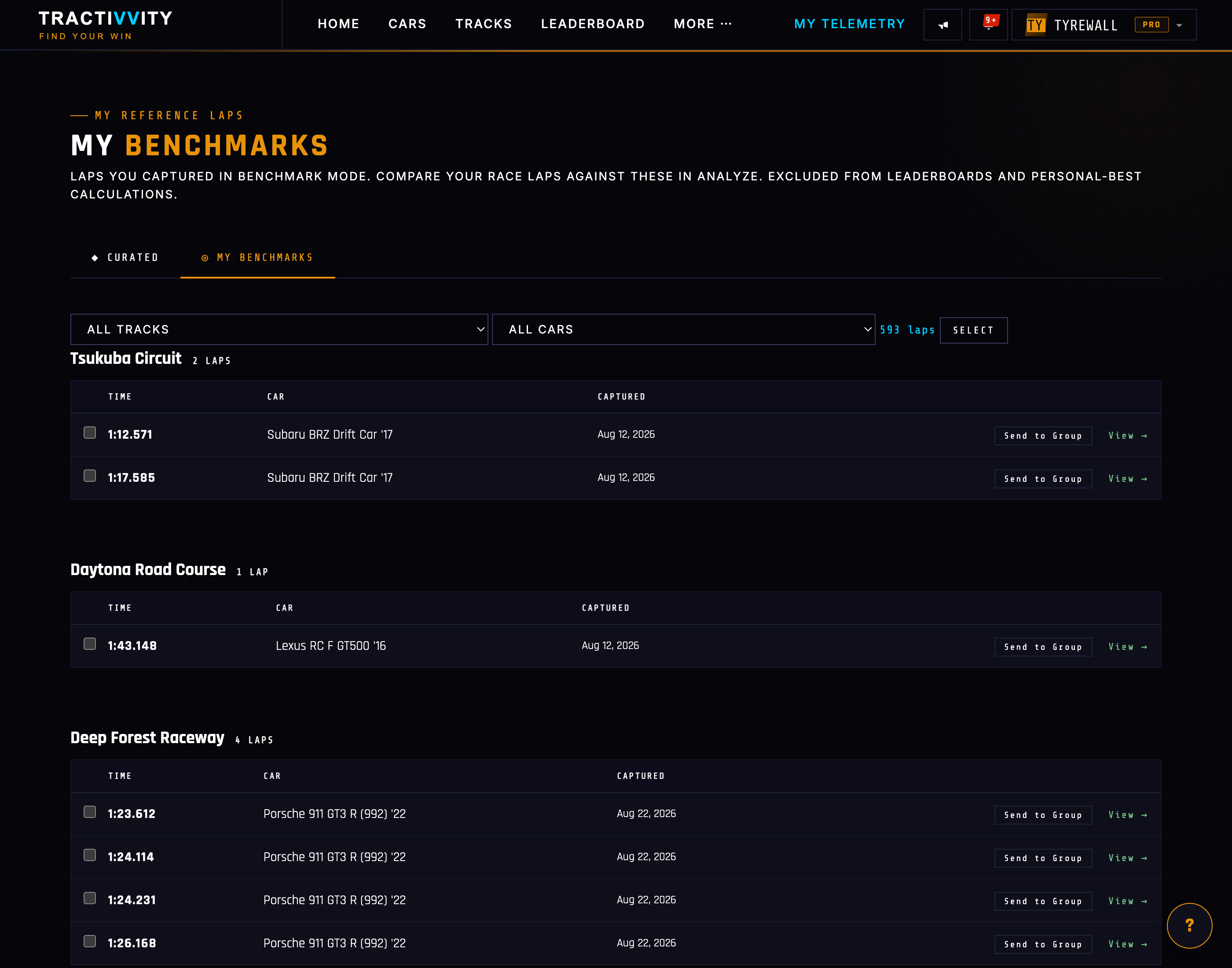
Chasing a world record is not always the useful exercise. A lap of your own from a good night — or a friend's lap, or a tidy lap in a car you are learning — is often the better reference, because the gap is small enough to be worth closing.
So you can mark any lap as a benchmark of your own. It stays private, it stays out of every leaderboard, and it becomes available everywhere a reference lap can be used: as a compare lap in Analyze, as the thing your live delta is measured against, and as the subject of the report below.
Recording one — it is called Replay Mode BASIC
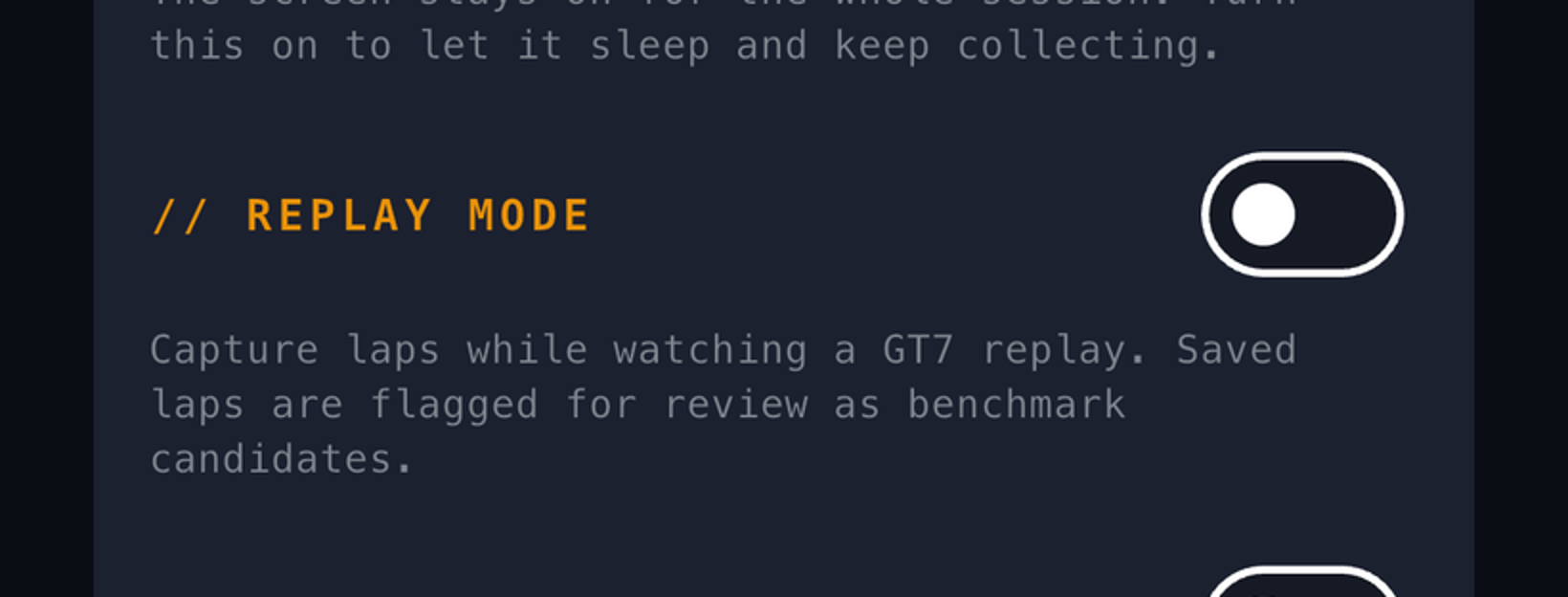
Normally the agent only records while you are driving. Replay Mode lifts that rule so it will record while you watch a GT7 replay instead — and the laps it captures are saved as your own benchmarks.
It is called Replay Mode because that is what GT7 calls the thing you are watching, and that is genuinely the clearest name for the action. But it is worth saying plainly what the outcome is: every lap you capture this way becomes one of your benchmarks. If you have used Replay Mode and never visited My Benchmarks, there is very likely a shelf of reference laps there already waiting for you.
It is available on the phone and in the desktop agent, in both cases as a switch you arm before recording. The agent's menu names it Replay Mode (capture as benchmark).
Benchmark Opportunities — the pre-flight read BASIC
This is the payoff, and it is the least like anything else in Tractivvity.
Every other Insights report looks at a lap you have driven and tells you what to fix. This one looks at a lap you are about to attack — and the driver it is written for has not turned a wheel yet. It reads the reference and hands you a plan.
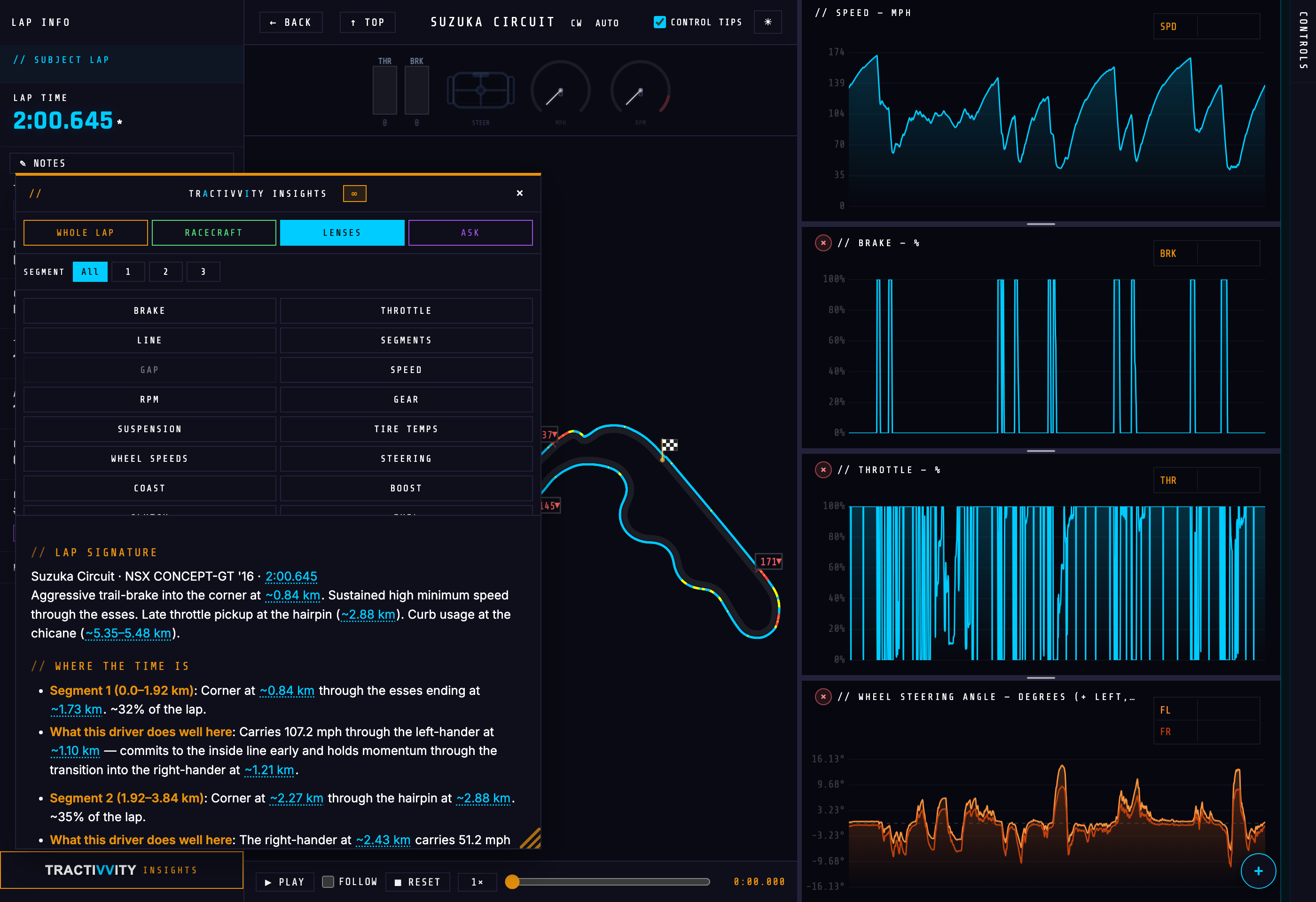
It will not criticise the driver who set the lap — there is nothing to criticise, and you are not being compared to them yet. Instead it describes, in order:
| Section | What it gives you |
|---|---|
| Lap signature | Track, car, time, and a one-line character sketch — where this driver is aggressive, where they hold speed, where they use the kerbs |
| Where the time is | The sections that consume the lap, with the share of lap time each one accounts for |
| What this driver does well | The specific thing being done that you would not guess from the map |
| Where to study | Corners worth planning before you go out |
| What to commit to memory | Brake points and throttle pickups that are not obvious |
| What might catch you | What a driver seeing this lap for the first time walks straight into |
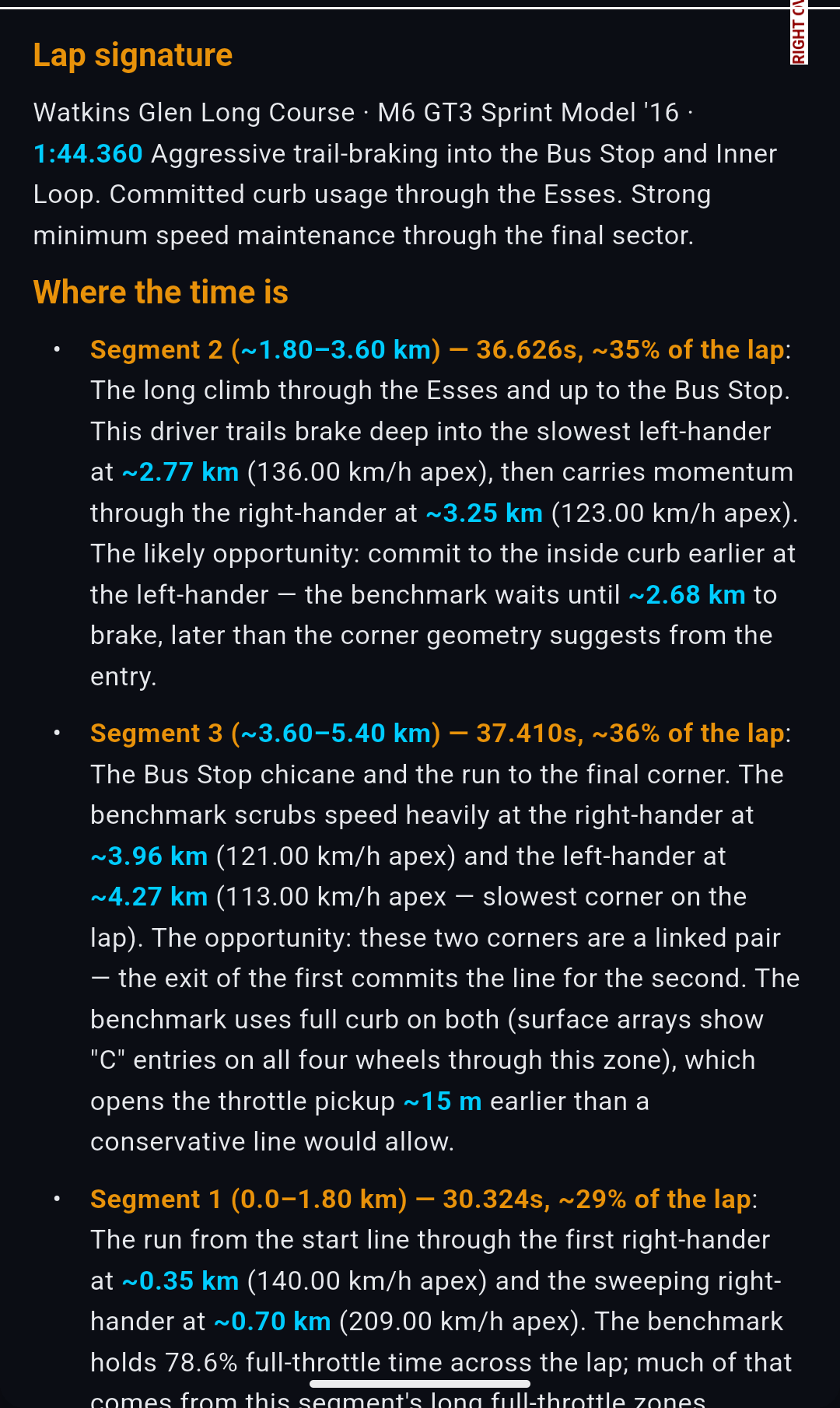
The observations are concrete because they come out of the telemetry, not out of general track knowledge. A real one reads: “commit to the inside kerb earlier at the left-hander — the benchmark waits until ~2.68 km to brake, later than the corner geometry suggests from the entry.” That is a thing to try on your next out-lap.
This is the one report with a precondition. Open a benchmark lap and run it, or pin a benchmark as your compare lap first — from an ordinary lap it has nothing to read, and will tell you so rather than guess. On the phone it is at the far end of the lens row, so keep scrolling.
Pinning one for the drive BASIC
Everything above happens before the session or after it. This is the part that happens during it: a benchmark you have pinned becomes the lap the phone measures you against, corner by corner, while you are still on track.
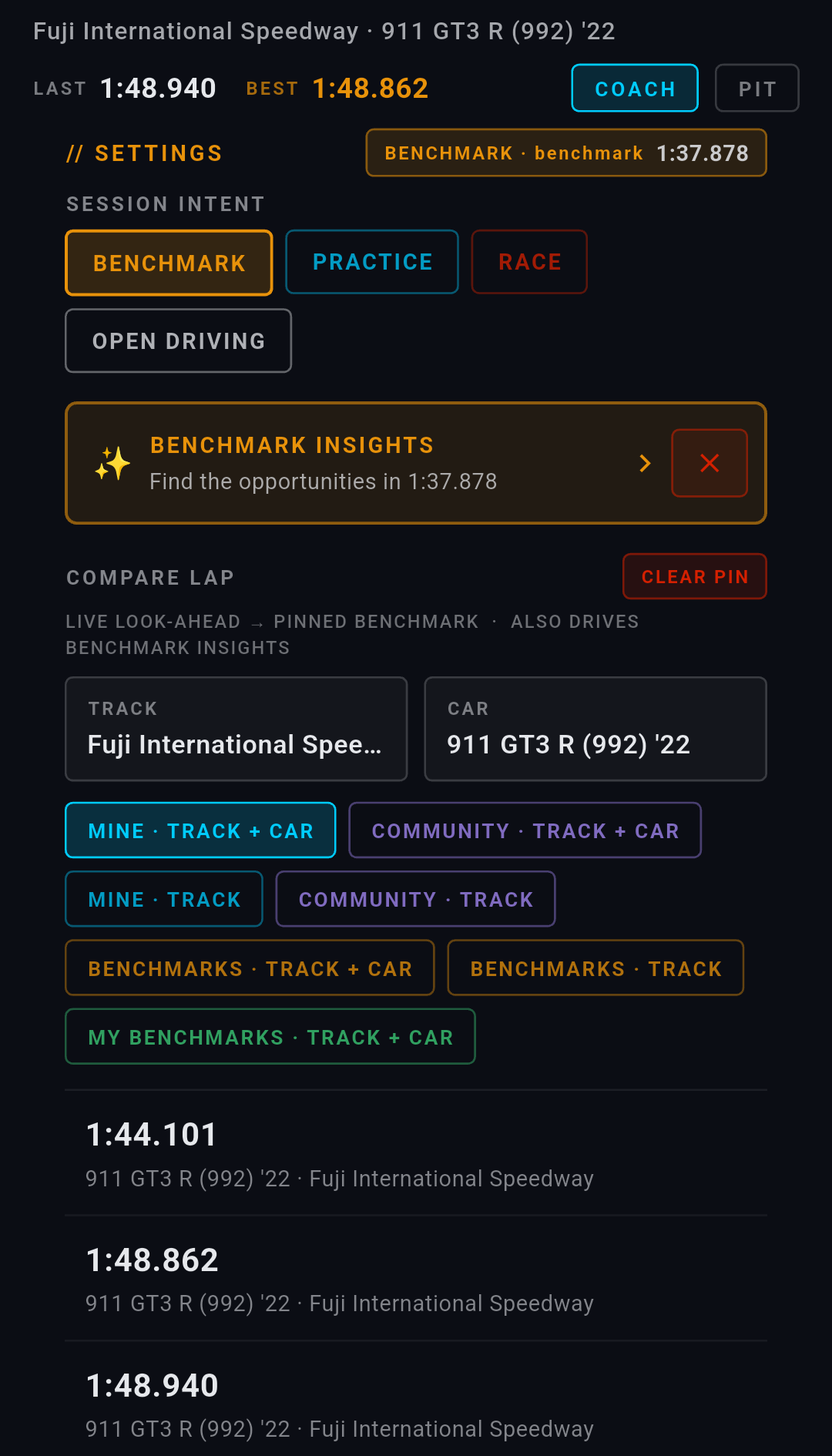
Set SESSION INTENT to BENCHMARK, then pick the lap under COMPARE LAP. Choose the track and the car, then the shelf:
| Source | What it offers | |
|---|---|---|
| MINE | Your own ordinary laps | BASIC |
| COMMUNITY | Laps other drivers have made public | BASIC |
| BENCHMARKS | The curated P1 laps | BASIC |
| MY BENCHMARKS | The reference laps you recorded yourself in Replay Mode | BASIC |
Each comes in a TRACK + CAR form and a TRACK form, so you can hold the car constant or open it up to anything that has been round this circuit.
Once a lap is pinned it follows you. An amber chip at the top of every board names it and carries its time, so what you are being measured against is on screen at all times rather than something you have to remember. CLEAR PIN takes it back off.
The board says so itself: LIVE LOOK-AHEAD → PINNED BENCHMARK · ALSO DRIVES BENCHMARK INSIGHTS. The same pin that feeds the live boards is the one Benchmark Opportunities reads, and a shortcut to the report sits right there on the board — BENCHMARK INSIGHTS · Find the opportunities in 1:37.878. Pin the lap in the garage, read the report, go out and drive against it.
What changes once it is pinned
The live session is a row of swipeable boards. Four of them compare, and every comparison they make is against the lap you pinned. PACE is on every account; DASH, TECHNIQUE and LINE are Pro. The table at the end of this section lays out which is which.
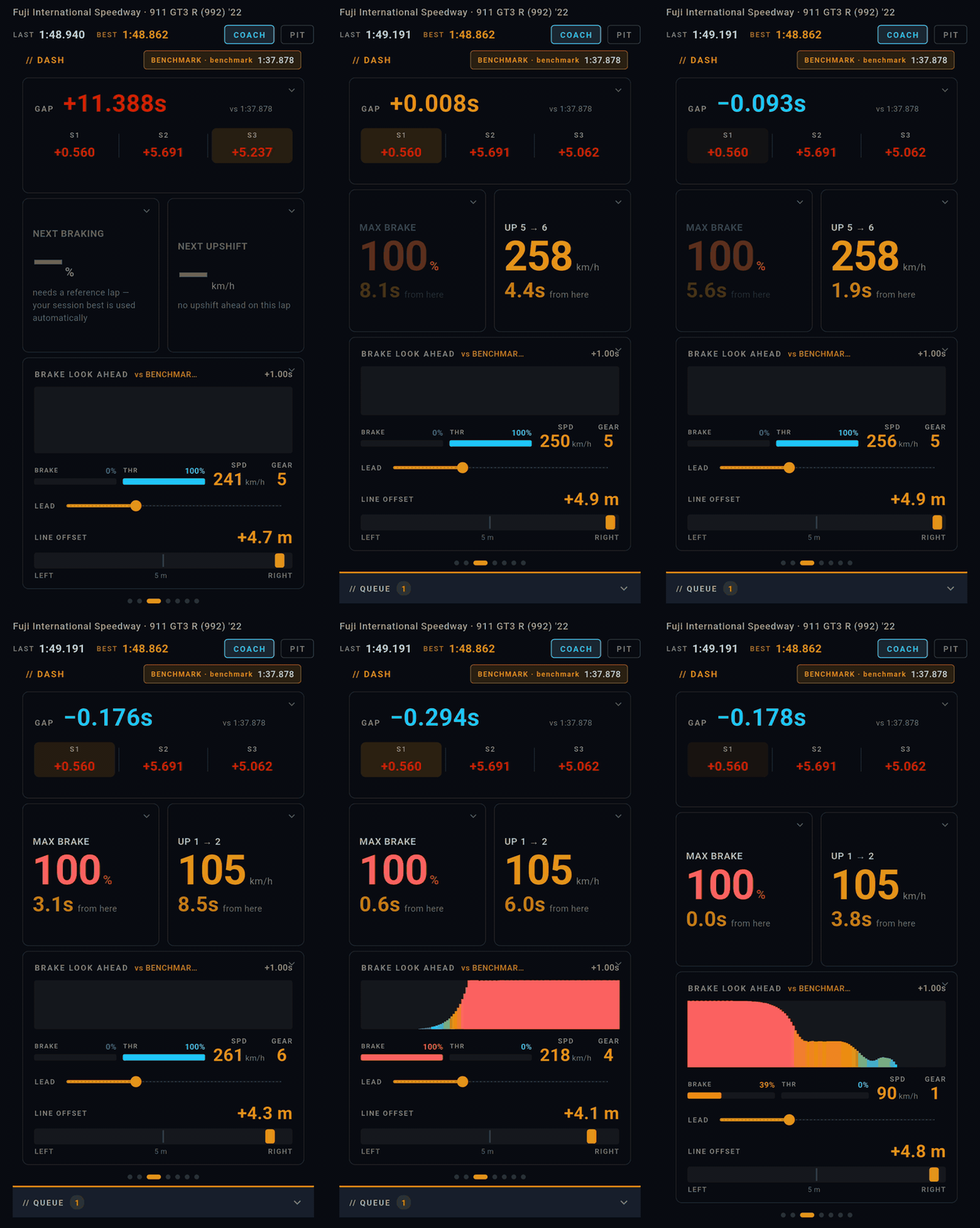
Under the gap sit the three sector deltas, with the sector you are currently in picked out. Each one keeps last lap's number until you complete that sector again, so the row is always a full lap's worth of comparison rather than three blanks waiting to fill.
Then two planning cards, and this is where the benchmark stops being a scoreboard and starts being instruction. MAX BRAKE shows the peak brake pressure the reference used at the braking point you are approaching, and how long until you reach it from where you are now. UP 5 → 6 shows the speed the reference was carrying when it took the next upshift, and when. Both are counted from your actual position, which is why they say from here.
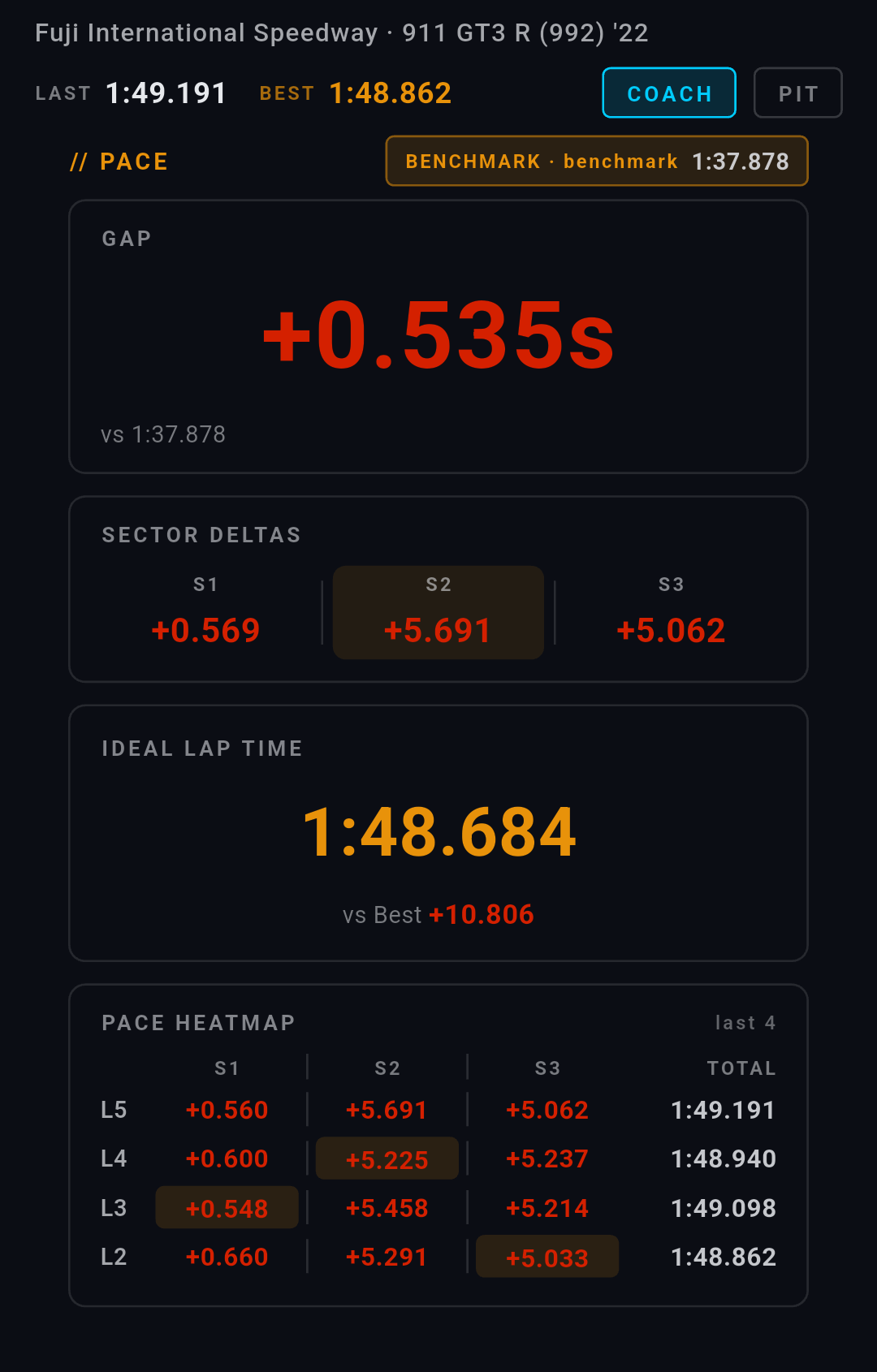
IDEAL LAP TIME is the lap you would have driven tonight if every sector's best run had happened on the same lap, and the figure beneath it is what that lap would be worth against the one you pinned. PACE HEATMAP lays out your last four laps sector by sector with the best of the four highlighted in each column — the fastest way to see whether a sector is improving or whether one good lap is flattering the rest.
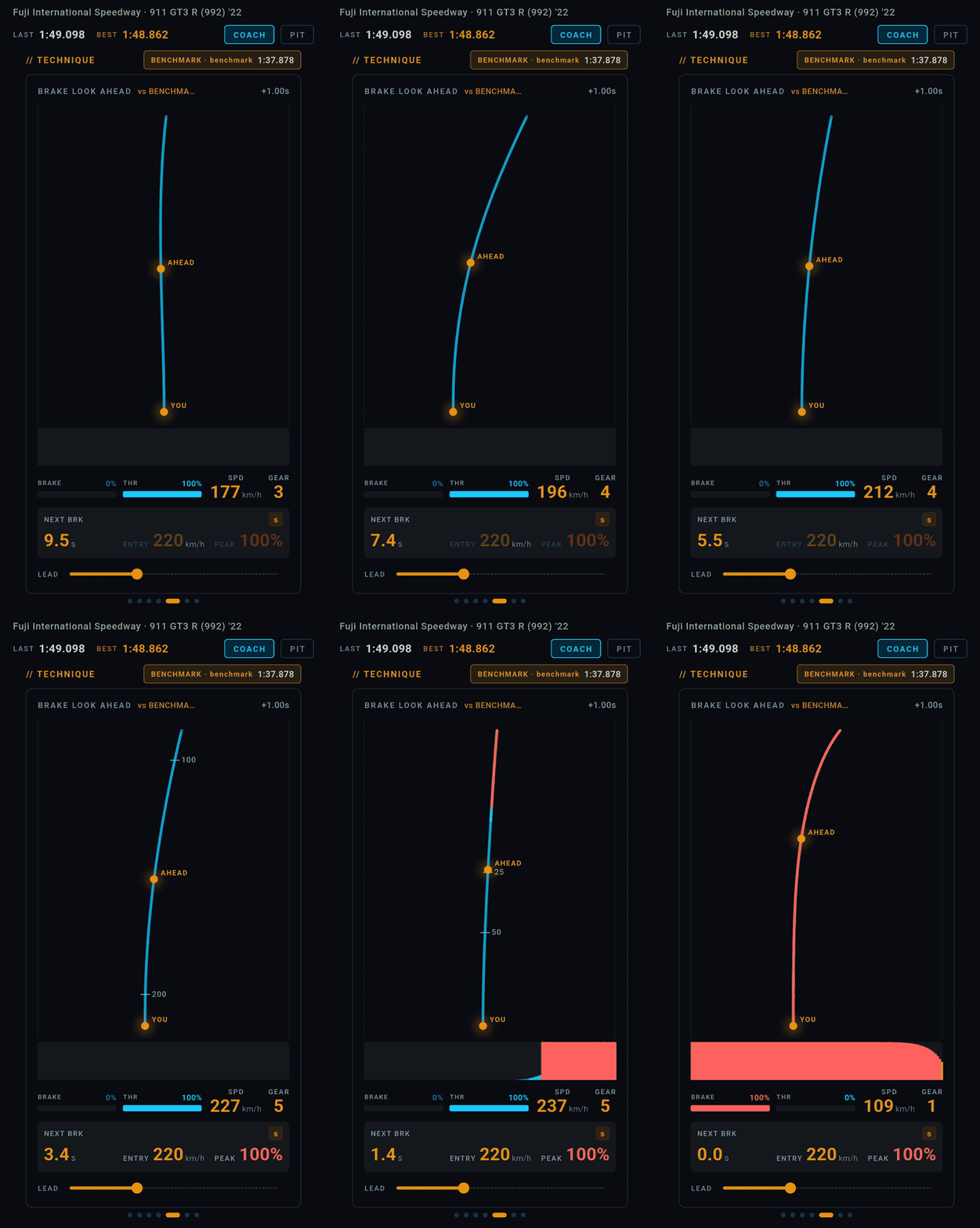
NEXT BRK counts down to where the reference lap braked; ENTRY is the speed it was carrying as it lifted in, and PEAK is how hard it pressed the pedal, as a percentage of travel. The small s badge switches the countdown between seconds and metres. The LEAD slider sets how far ahead of yourself the trace reads — anywhere from a twentieth of a second to three seconds — so you can dial it to the point where the warning arrives in time to act on it.
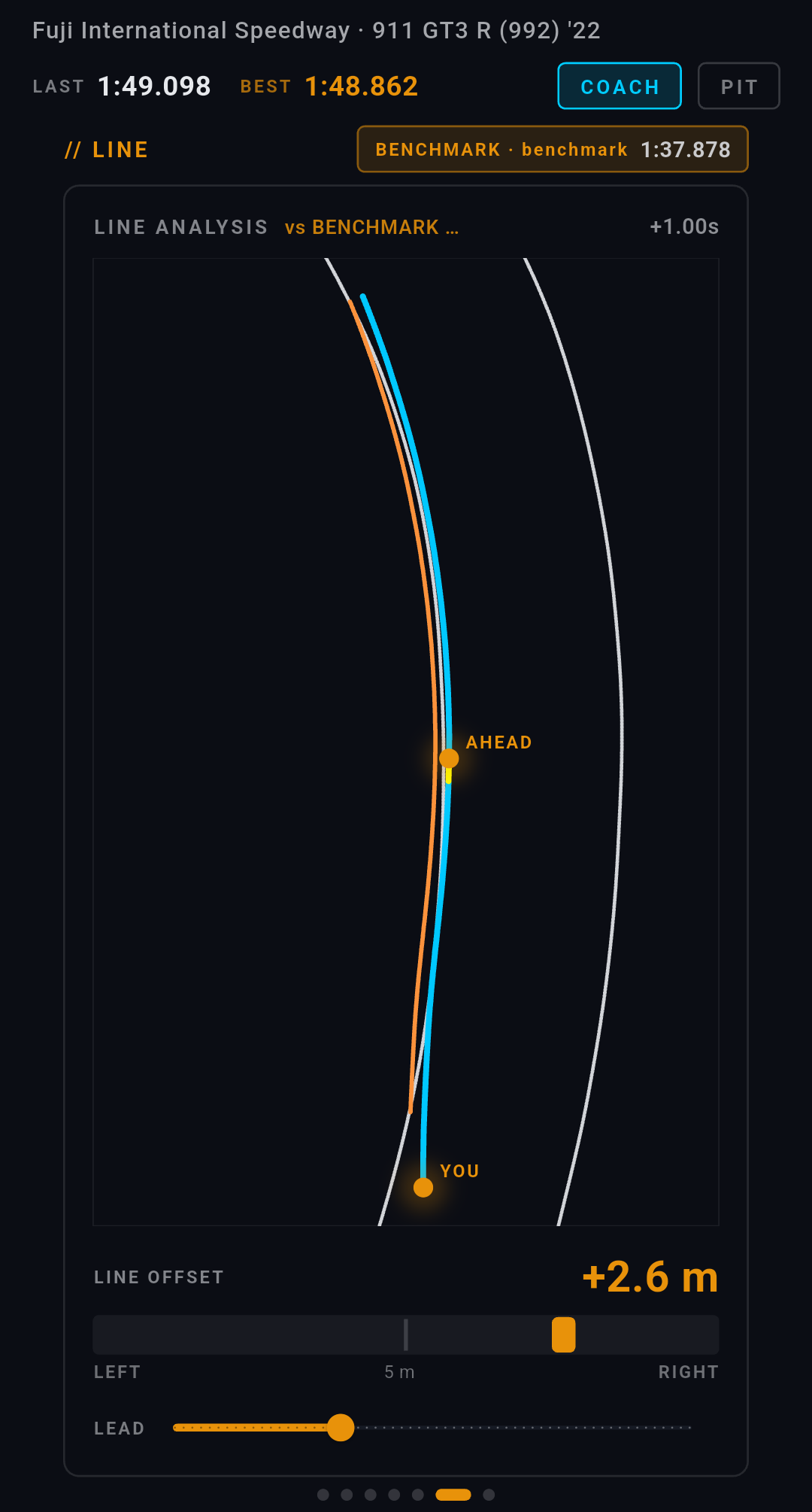
LINE OFFSET is the one number here that is not projected: it is how far left or right of the reference line you are right now, in metres. Watch it through a corner and you can see exactly where the two lines part company and how long it takes you to get back.
| Board | What the pinned lap does to it | |
|---|---|---|
| SETTINGS | Where you pin it | BASIC |
| TRACE | Your position on the circuit — no comparison | BASIC |
| PACE | Gap, sector deltas, ideal lap, heatmap | BASIC |
| DASH | All of the above condensed, plus the next brake and the next upshift | PRO |
| TECHNIQUE | The brake look-ahead in full | PRO |
| LINE | Line against line, with the live offset | PRO |
| STINT | Tyres, fuel, grip and G — your car, not the comparison | PRO |
PACE works the same way, and you can pin any of your own laps to it. Pinning a benchmark — ours or one of your own from Replay Mode — and the boards that read it corner by corner are part of Pro.
Browsing them on the phone
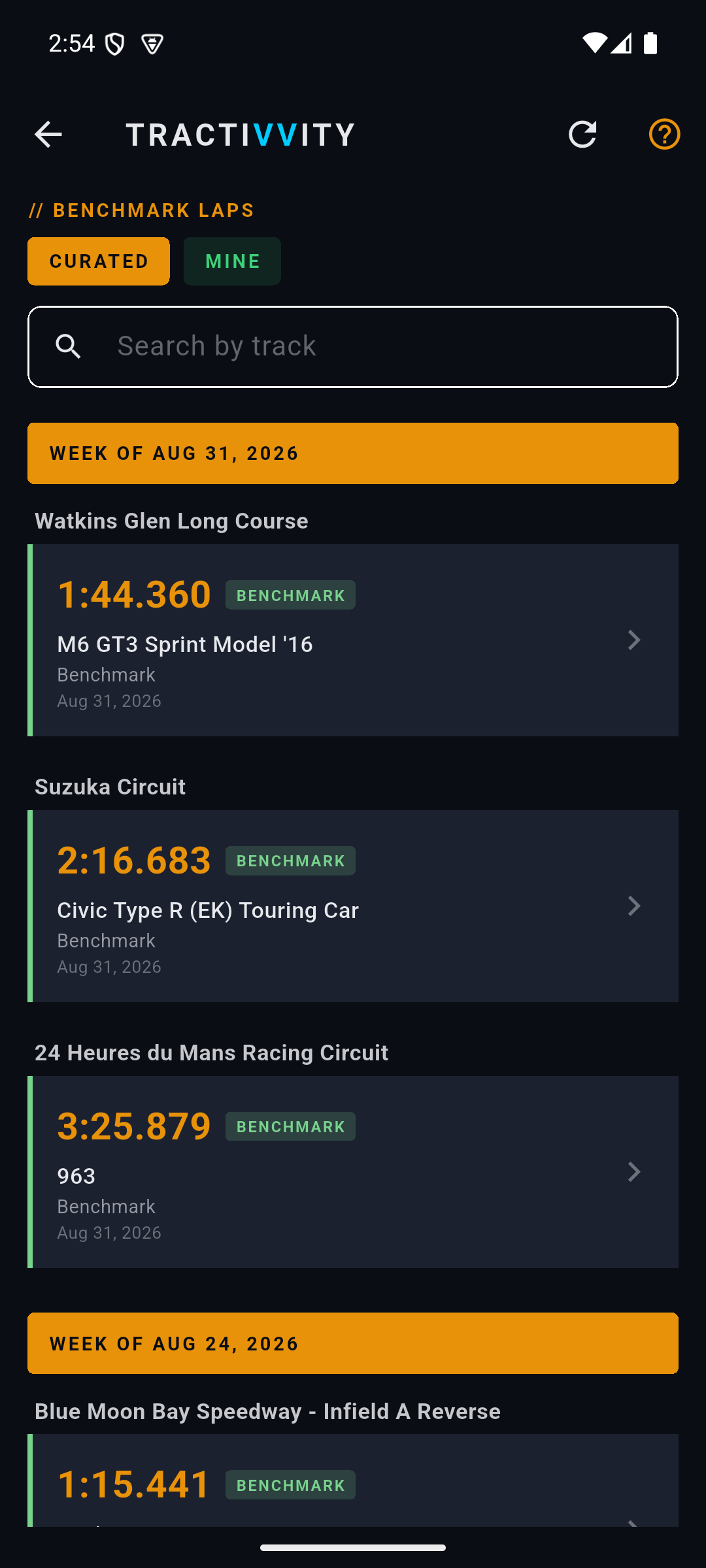
Both collections are on the phone under Benchmarks, split by the same Curated and Mine tabs. Open any of them and you get the lap the way you would get your own: the map, the traces, the playback, and Insights.
Record a reference lap with Replay Mode, or take one of ours. Run Benchmark Opportunities on it before you drive. Pin it so your live delta measures against it while you do. That is the loop, and it is the closest thing in the product to being handed a fast driver's notes.