Tractivvity · Feature guide · Gran Turismo 7
Coach
The voice in your ear while you drive, and the one that debriefs you after the lap. Two different things, and the difference is the point.
Two layers, not one feature
Insights is something you read after the fact. Coach is something you hear while you are driving. And it is not one system — it is two, working at completely different speeds, and understanding which is which is the whole of understanding Coach.
Instant coaching runs on your phone. No server, no network, nothing to wait for. It watches the live telemetry stream and speaks the moment something crosses a line — fuel down to a number of laps, a tyre going hot, the stint tipping out of its working window.
Adaptive coaching is written for you by the server. It reads your own history on this car and this track, what the rest of the field does with the same combination, and where you are in the lap right now — and writes a brief about it.
One is a reflex. The other is a considered opinion. You can run either, both, or neither.
On the Voice Coach screen the two carry their own descriptions, and they are the shortest honest summary of this whole section: instant coaching is “on‑device · free · offline”, adaptive coaching is “server · LLM · uses quota”.
Instant coaching BASIC
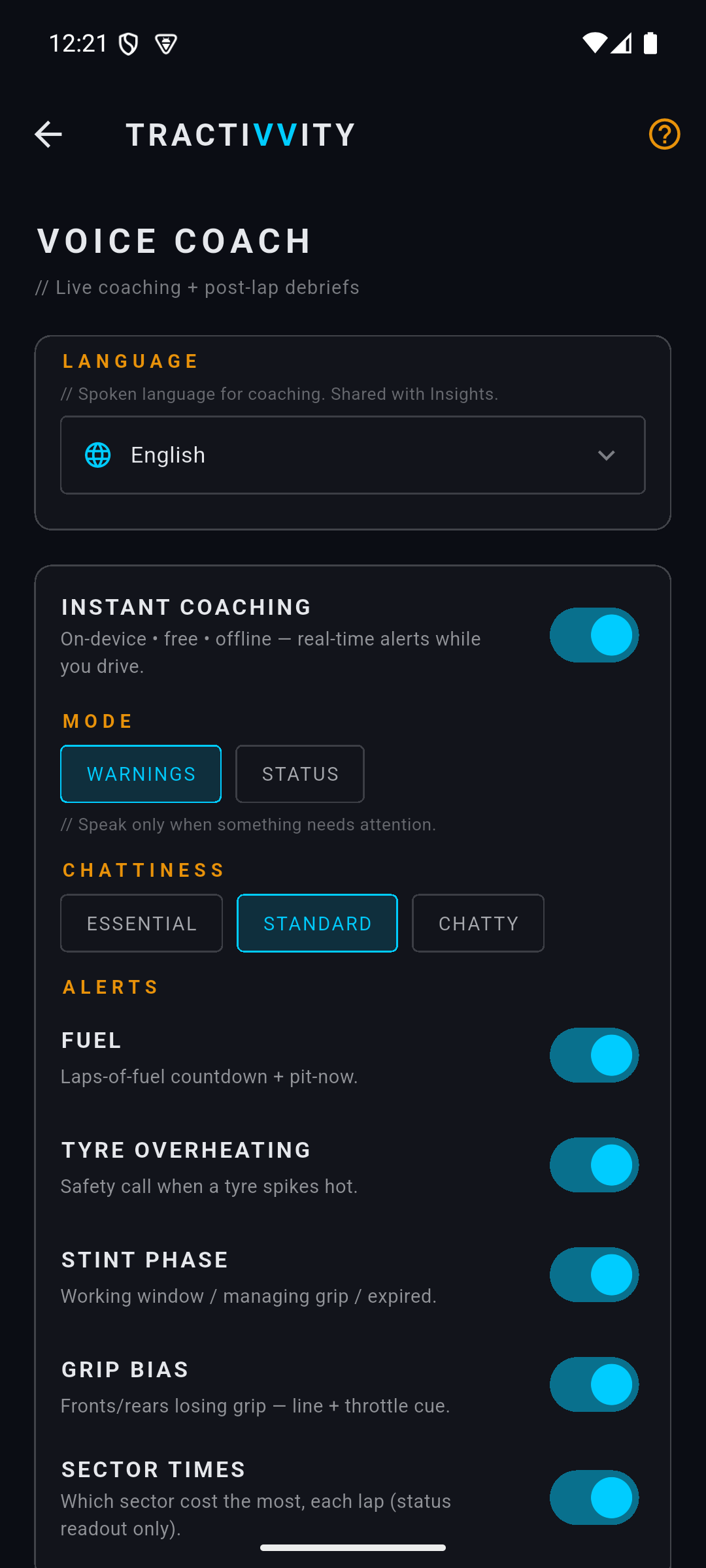
This is the layer that can speak mid-corner, so the interesting engineering in it is not what it says — it is when it decides to stay quiet.
Every packet, the phone scores how busy you are. Braking counts for most of it, then how far the wheel is turned, then how fast you are turning it, then lateral load, then how much you are feathering the throttle. If that score is high, the utterance is dropped rather than queued — you cannot ask somebody to process a sentence at the apex, and a coach that talks over your hands is worse than one that says nothing.
It is also sparse on purpose. Steady state is never spoken: it will not tell you the tyres are still cold. What earns a sentence is a change — a threshold crossed, a phase entered, a trend breaking from your own normal.
Five things have their own switch, because drivers disagree about which of them is noise:
| Alert | What it calls |
|---|---|
| Fuel | Laps-of-fuel countdown, and pit-now |
| Tyre overheating | A safety call when a tyre spikes hot |
| Stint phase | Working window, managing grip, expired |
| Grip bias | Fronts or rears losing grip, with a line and throttle cue |
| Sector times | Which sector cost you the most, each lap |
Mode decides whether it speaks only when something needs attention or reads you a status line as things change, and Chattiness sets how much gets through — essential, standard or chatty. It speaks with the best voice your phone has installed for the language you picked.
The instant layer can also lean on your history — a hint that your fuel burn has crept up across recent sessions, or that you are managing tyres earlier than usual for this combination. It gets that by fetching the same profile in the background, and it can only do that once it knows which car and track you are on, which it learns when your first lap of the session finishes uploading. So on that first lap the live layer is running on thresholds alone: fuel, temperature, stint phase and grip all work normally, but the “compared with your usual” hints are not there yet. Adaptive briefs are unaffected — the server does its own lookup.
Instant coaching is not a paid feature and is not planned to be one. It is computed on your phone from telemetry you already captured, so it costs nothing to run for you — and a driving aid that only paying accounts can hear is the wrong thing to charge for.
Adaptive coaching BASIC
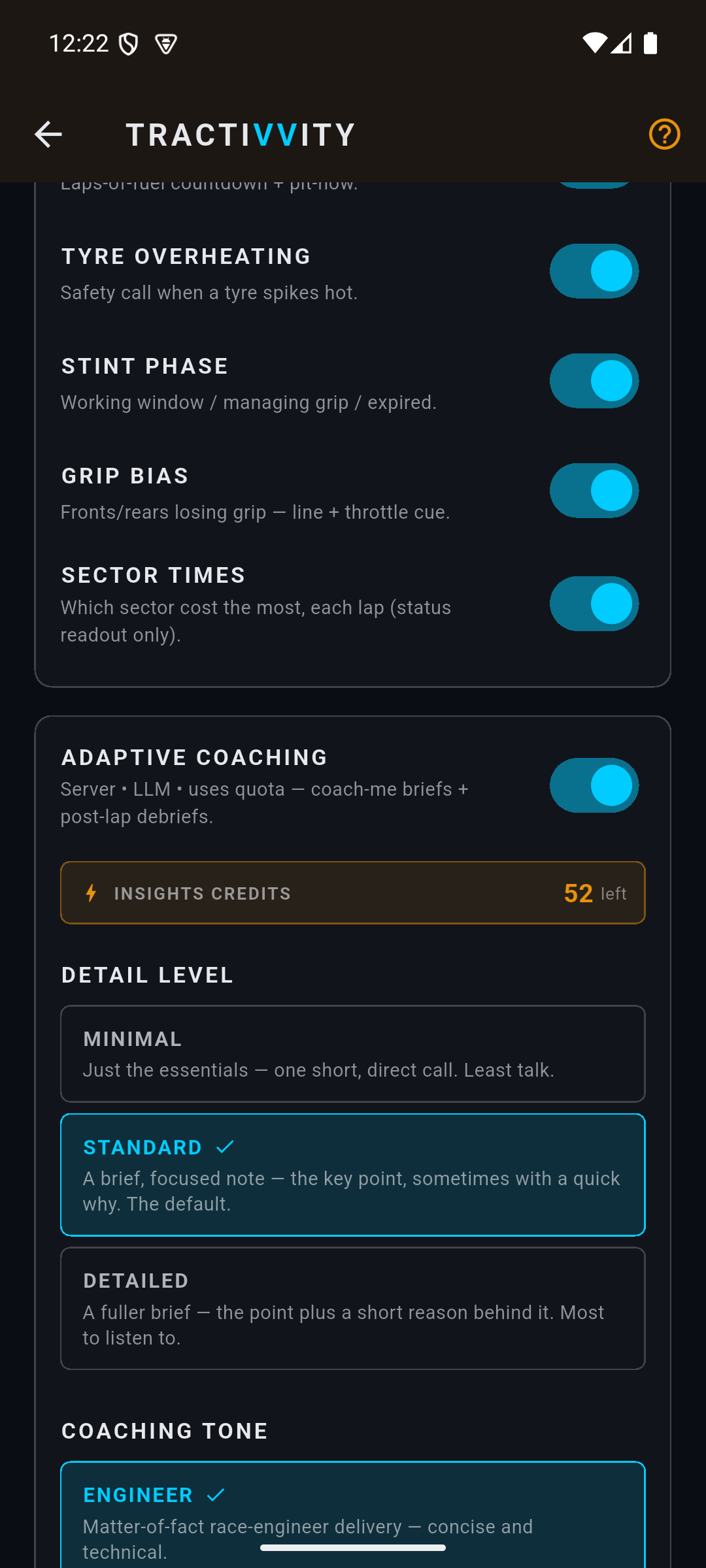
Where instant coaching reacts, adaptive coaching knows things. When you ask for a brief, the server looks up your own history on that exact car and track, and the field's, and writes against it. That is the part nobody else has: not track knowledge from a book, but your record and everyone else's.
It knows which car and track you are on because the brief request says so, so a brief carries your full history from your first lap of a session onward — nothing has to warm up first. The lookup is cached for a day and thrown away the moment you upload a new lap on that combination, so it never coaches you against a version of yourself you have already improved on.
What goes into it:
| What the server knows | |
|---|---|
| You, on this combo | How many sessions you have run, your best lap, the lap you normally pit on, how much fuel you burn a lap, how long your tyres take to come in and how long before you are managing them, and which sectors are consistently your weakest |
| You, lately | Whether your pace is going up or down across your last five sessions, whether your fuel burn has crept, whether you started managing tyres earlier than you usually do |
| Everyone else | What the top ten percent lap in this car here, the field's median fuel burn and pit lap, and how far each of your sectors is off that top ten percent |
When a brief is asked for, that profile goes to the model together with a snapshot of right now — which lap you are on, how far into it, what phase the stint is in, fuel remaining, where you are on track, your speed, your recent sector deltas, and the last half‑second of your throttle and brake traces. The answer comes back as one or two sentences of directive, not a recap of what you just did.
Why it can do this without lagging
Coaching has an awkward requirement: it has to answer in milliseconds, and it has to know things that take a database to work out. Those pull in opposite directions, and the way out is to keep them in different places.
| Layer | Where it lives | How fast |
|---|---|---|
| The decision to speak, and the threshold rules | Your phone | Immediate — inside a single telemetry packet |
| Your history and the field's, for this car and track | Cached on your phone once fetched | Already there — no wait at all |
| A written brief | The server | Seconds, and only when asked |
The consequence is that the network is barely involved. In a normal session the phone talks to the server about your coaching twice: once to pull the profile after your first lap identifies the combination, and then only when a brief is actually wanted. Every real-time decision — whether now is a safe moment, which of several things matters most, what to say — happens on the handset. That is why instant coaching still works with no signal, and why it does not get slower when the server is busy.
It also means the two layers fail independently, which is the useful part. Lose connectivity and you keep the countdown, the temperature warning and the stint calls; you just do not get briefs until it comes back.
What each layer actually looks at
This is the distinction worth carrying away, because the two layers can speak about the same subject and mean completely different things by it.
| Instant | Adaptive | |
|---|---|---|
| Runs on | Your phone | The server |
| Speed | Immediate — faster than you can notice | Seconds |
| Sees | The live stream, this instant | Your history, the field, and this instant |
| Time horizon | Now | This stint, this session, your last five sessions |
| Decides by | Fixed thresholds you can switch on and off | A model weighing what matters most |
| Says | One short call — a number, a warning | A directive with a reason |
| Costs | Nothing, ever | Credits, per brief |
| Offline | Works | Needs the network |
Put concretely: instant coaching tells you a tyre is over temperature as it happens. Adaptive coaching tells you that you have started managing tyres two laps earlier than you normally do on this combination, and that the field pits a lap later than you. Neither replaces the other.
Where you hear it
The phone is the natural home for coaching, because it already has the telemetry, a speaker and your ear. But a lot of drivers have a headset plugged into the console, where the phone cannot reach them — so adaptive coaching can come out somewhere else instead.
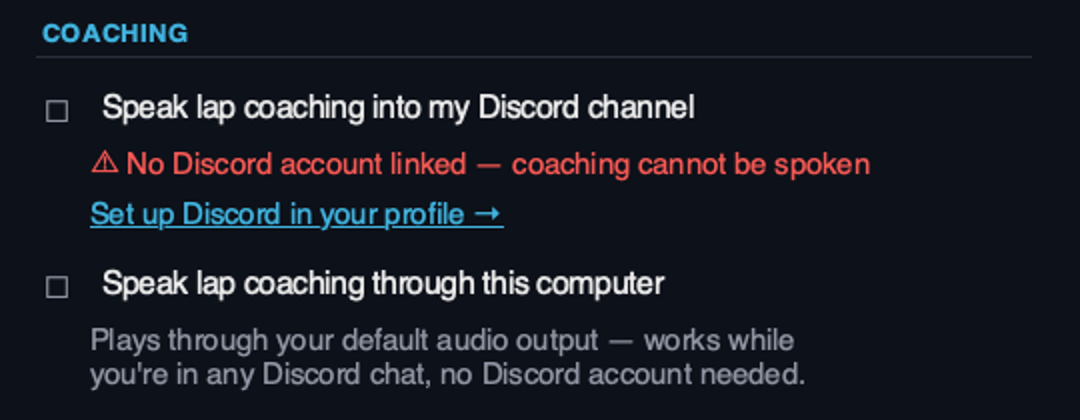
The desktop agent can speak the brief through your computer's own audio, which works whatever else you are doing — including sitting in someone else's Discord call. Or it can hand the audio to Tractivvity's coach bot, which joins your own private Discord voice channel and speaks there, so it arrives in the headset you are already wearing. That route needs a Discord account linked to your profile; the local-audio route needs nothing.
The agent deliberately does not do any coaching of its own. The instant layer stays on the phone, because that is where the live packet stream and the load estimator live. What the agent does is ask for a brief after a lap and speak the finished text.
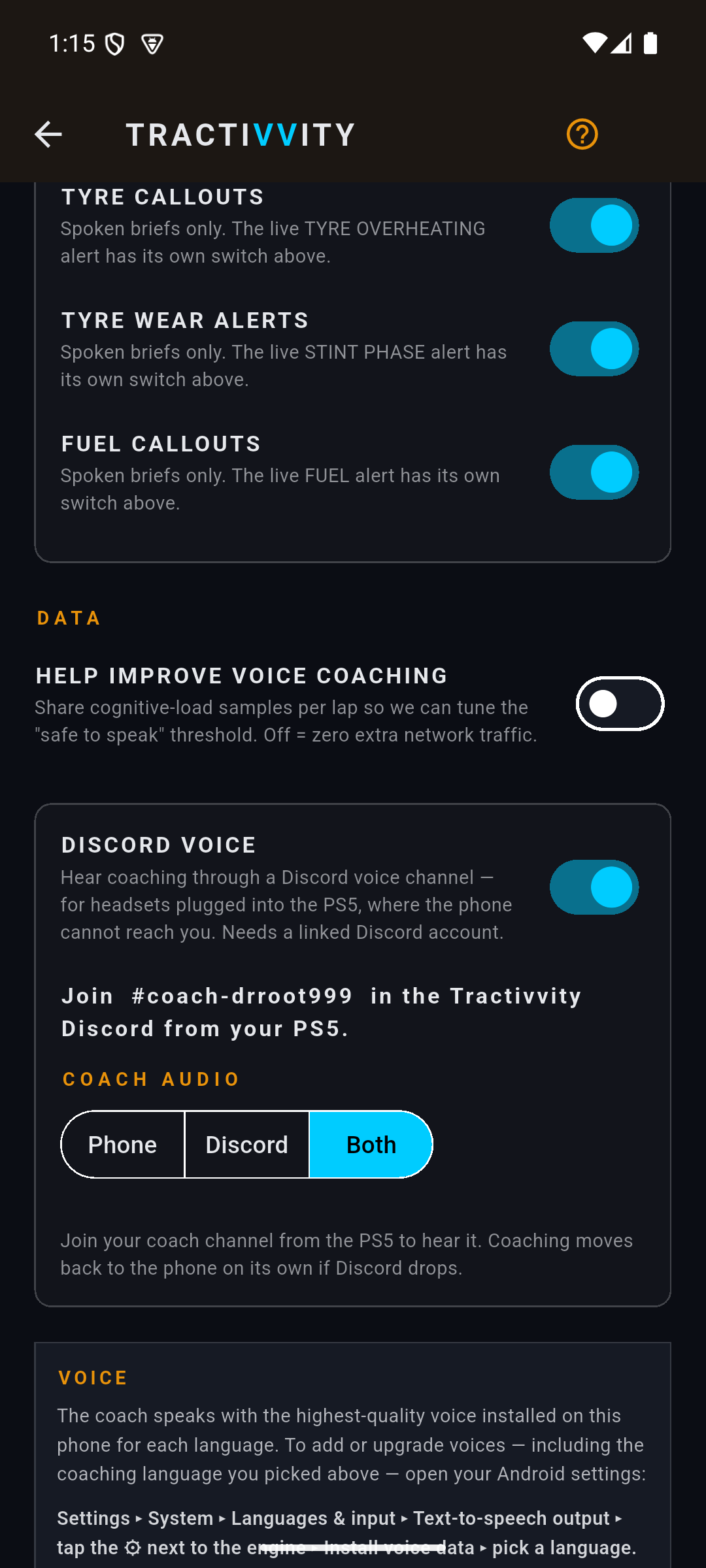
Turning Discord voice on from the phone does two things. It provisions a voice channel of your own in the Tractivvity Discord, named after you, and tells you to join it from the console — and it adds a Coach audio control that was not there before, with three settings:
| Coach audio | Where the voice comes out |
|---|---|
| Phone | The handset's own speaker, as if Discord were off |
| Discord | Only the voice channel — the headset on the console |
| Both | Both at once. The default once Discord is on |
You do not have to manage the connection. If the Discord side goes quiet, coaching returns to the phone by itself — there is nothing to switch back.
When the phone and the agent are both recording
Nothing stops you running both. The phone reads the telemetry stream and so does the agent, and for capture that is harmless — one lap still becomes one lap.
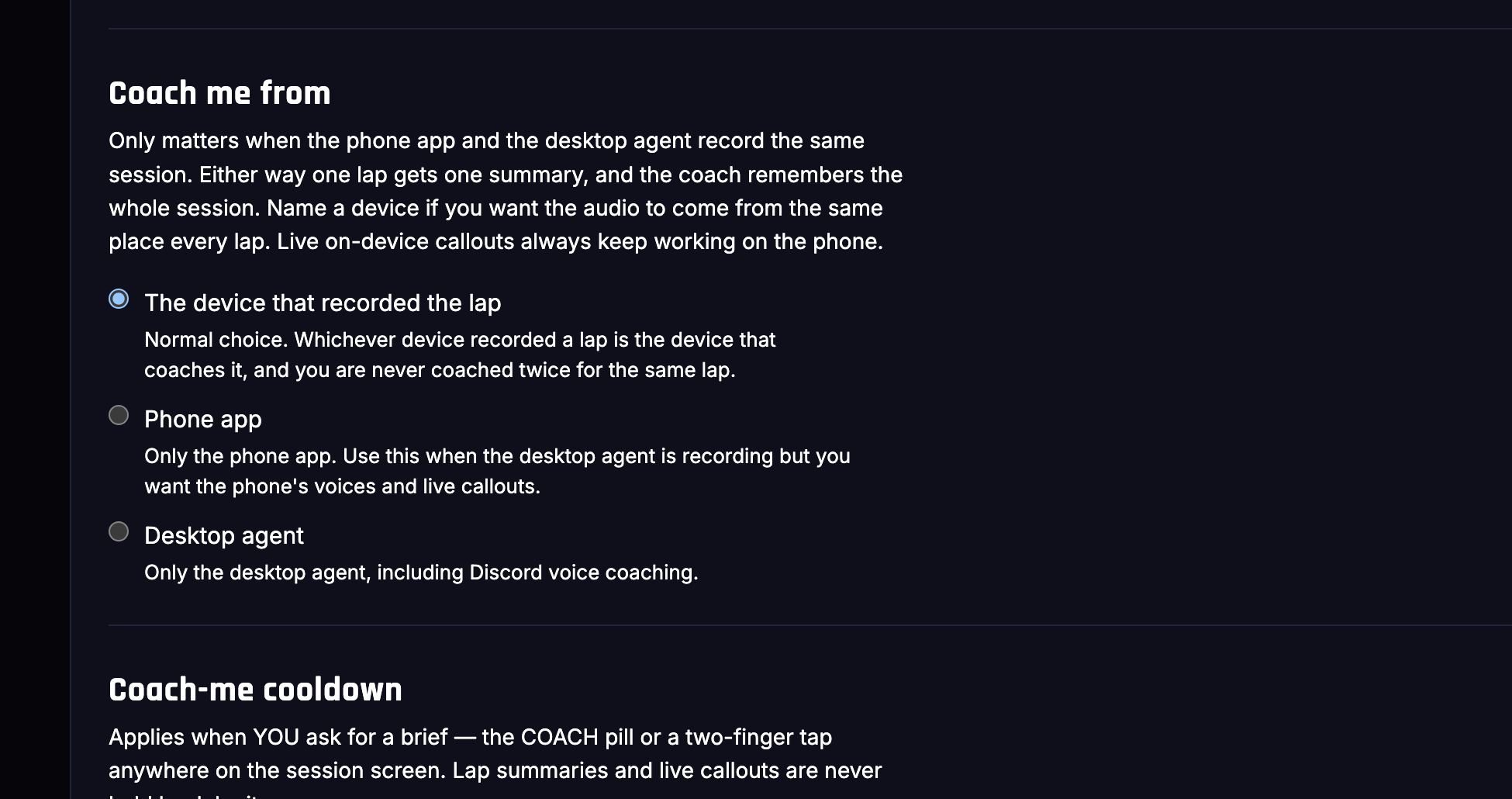
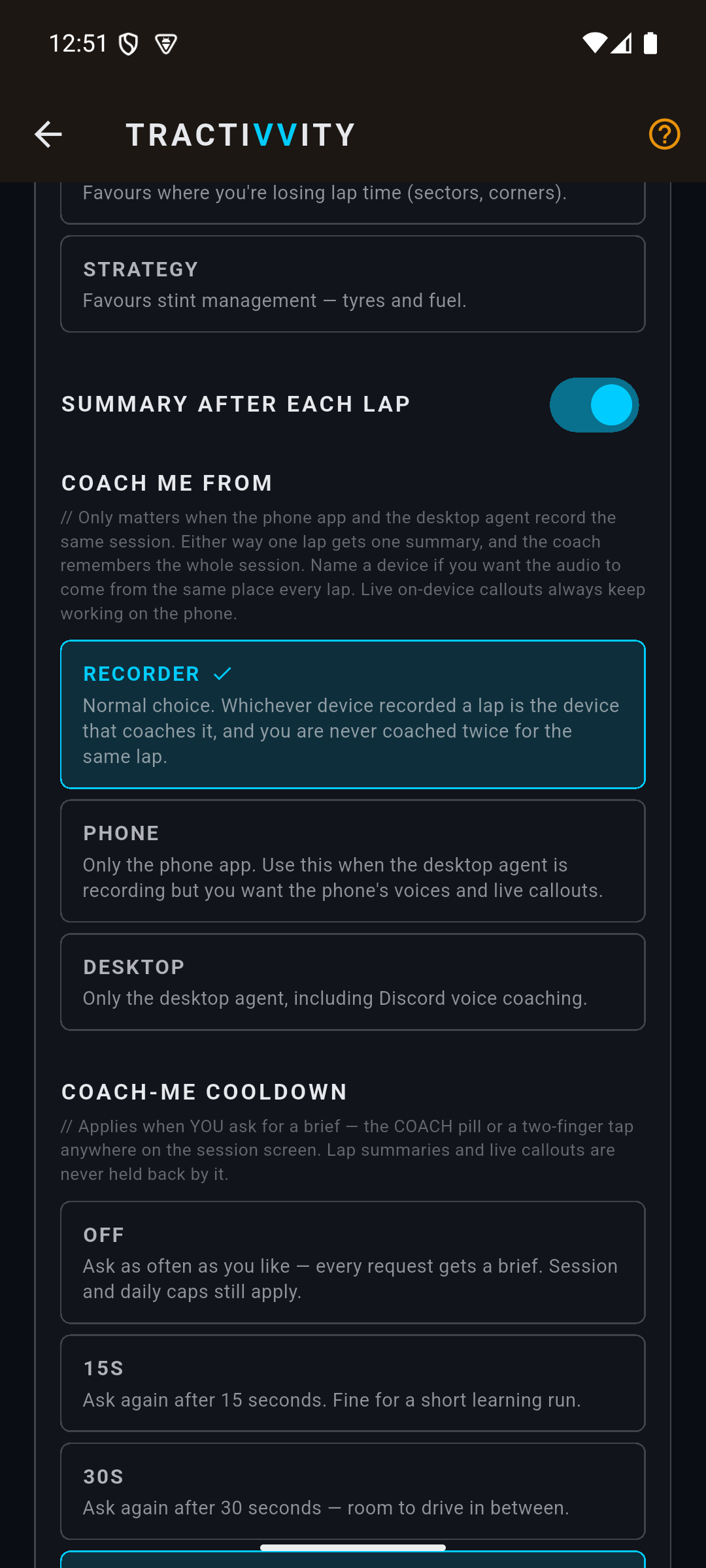
Coaching is where it matters, because a lap that got recorded twice can get debriefed twice: two briefs written about the same lap, in two different sets of words, out of two different speakers, costing two lots of credits. Coach me from is the setting that decides who speaks.
| Option | What happens |
|---|---|
| The device that recorded the lap | The default. Whichever device recorded a lap is the one that debriefs it, so you are never coached twice for the same lap — but the audio can come from either, depending on which one got there first |
| Phone app | Only the phone speaks. Use it when the agent is recording but you want the phone's voices and its live callouts |
| Desktop agent | Only the agent speaks, which includes the Discord route. The choice when your ears are on a headset plugged into the console |
Either way, one lap gets one summary and the coach still remembers the whole session. Naming a device is about wanting the audio to come from the same place every lap rather than about losing anything. And whichever you pick, the phone's live on‑device callouts keep working — that setting only governs the spoken briefs.
One set of preferences, everywhere
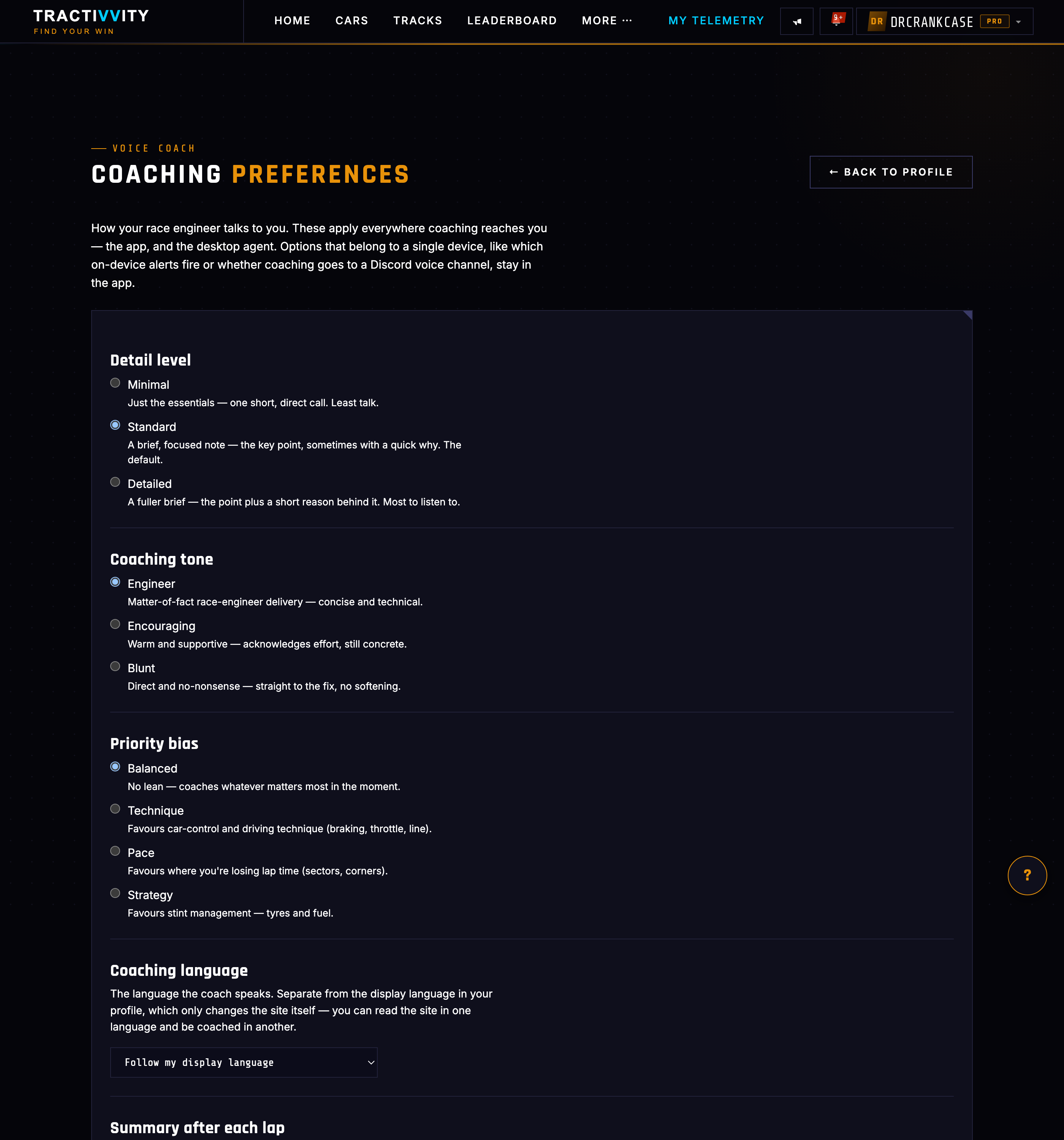
How the coach talks to you is stored on the server, not on a device, which matters more than it sounds. The desktop agent has no settings screen for tone or detail; it asks the server for a brief and the server applies your preferences when it writes one. So the choices live in one place and reach every surface.
| Setting | What it changes |
|---|---|
| Detail level | Minimal, standard or detailed — how much brief you want read to you |
| Coaching tone | Engineer, encouraging or blunt |
| Priority bias | What to favour when several things apply: balanced, technique, pace or strategy |
| Coaching language | The language the coach speaks, separate from the language the site is in — you can read the portal in English and be coached in German |
| Summary after each lap | Whether a debrief arrives on its own at the end of every lap |
| Coach-me cooldown | The minimum gap between briefs you ask for, from off up to three minutes |
| Topic switches | Pace, grip, tyre, tyre wear and fuel — five separate switches for what the spoken briefs are allowed to bring up |
The topic switches on the preferences page govern the spoken briefs only. The live alerts have their own switches on the phone's Voice Coach screen. They read similarly — a “fuel” switch in each place — but turning off fuel briefs does not silence the live fuel countdown, and it is not meant to. One is the considered layer, the other is the reflex.
Asking for one, and what it costs
A debrief can arrive by itself at the end of a lap. Beyond that you ask: the Coach pill on the session screen, or a two-finger tap anywhere on it. A three-finger long press mutes the coach outright — the phone buzzes and the pill turns red — and holding again brings it back. That is the control you want when a passenger walks in, and it is deliberately a gesture rather than a menu.
Adaptive briefs draw on the same credit balance as Tractivvity Insights: one pot, spent on whichever you use. A brief is far cheaper than a lens report, and the balance sits on the Voice Coach screen so it is visible before you ask. Instant coaching never touches credits, so the countdowns and warnings keep going after the pot is empty.
Three things pace the asking, and they exist so a coach cannot turn into a stream of chatter you stop listening to:
| Limit | Why |
|---|---|
| Your chosen cooldown | The gap between briefs you ask for. Yours to set, from off up to three minutes |
| A cap per session | Stops a single stint absorbing an afternoon's worth of briefs |
| A cap per day | The backstop, and the reason the cooldown can safely be set to off |
Lap debriefs are exempt from the cooldown, which is the behaviour you want: the summary at the end of a lap should not be swallowed because you asked a question on the previous straight. Live callouts are never held back by any of it.
One switch on the phone, off by default, shares how loaded you were through each lap so the “safe to speak” threshold can be tuned against real driving rather than a guess. Off means exactly zero extra network traffic. It is opt‑in because it is our problem, not yours.