Tractivvity · Feature guide · Gran Turismo 7
Foundation
What Tractivvity is, how the three pieces fit together, and what a lap actually stores.
The shape of it
Tractivvity is three pieces. Two of them capture your laps, two of them let you read your data, and all three of them coach you — what changes is where the voice comes out, and what else that piece is good for while you are there.
| Captures laps | Live while driving | Reading your data | Coaches you | |
|---|---|---|---|---|
| Mobile app | ✓ | ✓ | wherever you are | spoken, in your ear |
| Web portal | — | — | the full depth | written brief |
| Desktop agent | ✓ | — | — | spoken, computer or Discord |
The app and the portal
The mobile app is the fullest of the three pieces — the only one that touches every capability at once. It captures, it shows you live data while you are on track, it carries your whole history, and the coach speaks through it. That breadth is why it is the primary interface, and why most drivers spend most of their time there.
Breadth is not depth. The app does not do everything the portal does, and it is not trying to. They are two different jobs.
The one you live in
Where most drivers arrive and where most days happen. In your hand at the track, running the live dashboard while you drive, with the coach speaking through it and your laps, groups, leaderboards and practice sessions travelling with you. This is the racing end of the product — immediate, in the moment, and the piece we will keep pushing hardest.
The live dashboard is a stack of swipeable boards. Trace, Pace and Settings come with any account; Dash, Line, Technique and Stint are Pro.
The one you think in
Screen real estate changes what is possible, and nothing about a phone is going to replace it. The map, the trace, a comparison lap and the panel catalog all open at the same time. Corner-by-corner tables. Ninety days of habits in one view. When you want to sit down and genuinely read a lap, you want a monitor — and that is where the time gets found.
Where a recommendation gets backed up
A coaching call has to come from somewhere. When the coach tells you — in your ear on track, through Discord, or in a written brief afterwards — that you are giving away two tenths at Turn 8, that claim is only worth as much as the evidence behind it.
Every surface can deliver the recommendation. The portal is where you go to check it: the trace through that corner, the comparison lap that did it better, the corner-by-corner table, the ninety days showing you have done the same thing all season. The app tells you what to do. The portal shows you why it said so.
What the portal extends
Nearly every feature in this guide exists on both surfaces. What changes is how much of it you can hold in view at once, and the portal is almost always the wider of the two.
A group in the app is your group and its lap feed. The same group on the portal opens with its leaderboard, its shared laps, its shared benchmarks, its shared tunes and its races sitting together. A track in the app is the track; on the portal it is the layout, the sector splits, the records and the leaderboard read against each other. A lap in the app is the lap; on the portal it is the whole workspace built around the lap.
A few things have grown up on the portal first — the ninety-day habit analysis and the setup library are the obvious ones today — and that balance keeps shifting as the app grows. Rather than draw a line here that will be out of date shortly, the sections that follow walk each main function in turn and show it where it is currently at its widest.
Getting laps in
Because the game is on a console, the question is never "computer or console" — it is simply whether you have a computer you are willing to leave running. You do not need one.
The mobile app
Captures straight from the console on its own. Nothing else has to be running. This is how most drivers start, and for a lot of them it is the only piece they ever install.
The desktop agent
Runs on a Mac or a Windows PC on the same network as the console, listening to the telemetry it is already broadcasting. No screen, no interaction — it captures, and it speaks your coaching through the computer or into a Discord voice channel.
If the agent and the app are live at the same time, the server de-duplicates on arrival. You will not end up with two copies of the same lap, and there is nothing you need to turn off or coordinate. Run whichever is convenient on any given day, or both.
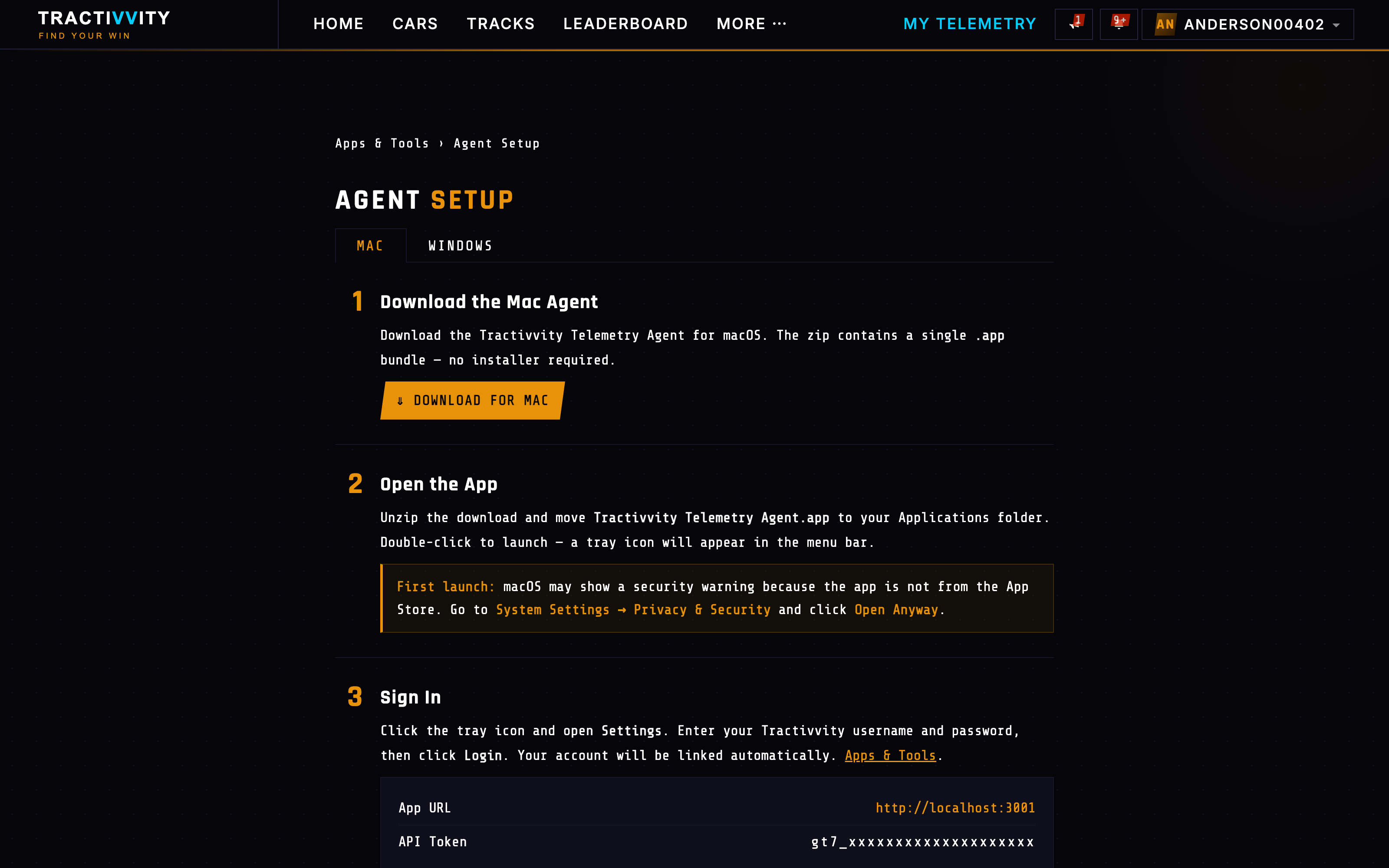
Setting the desktop agent up
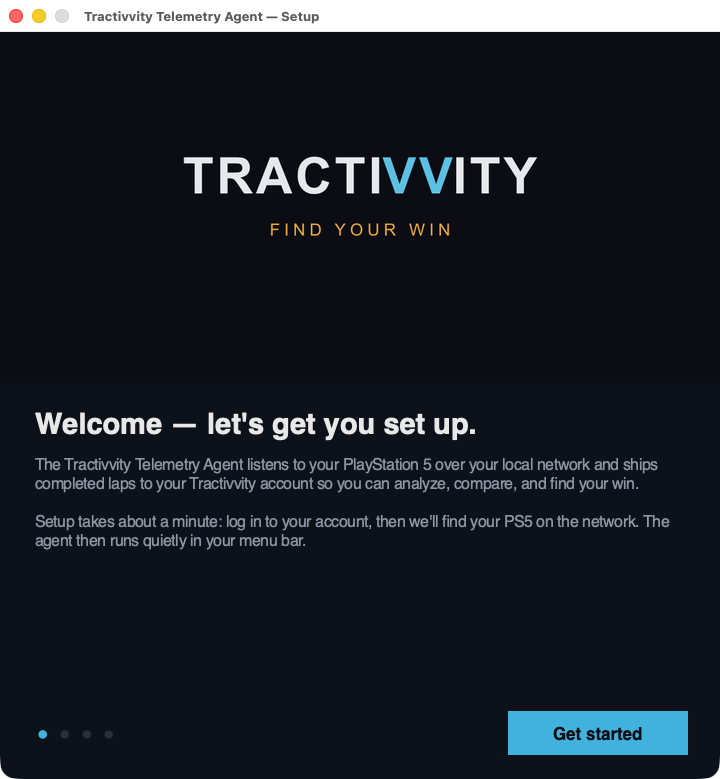
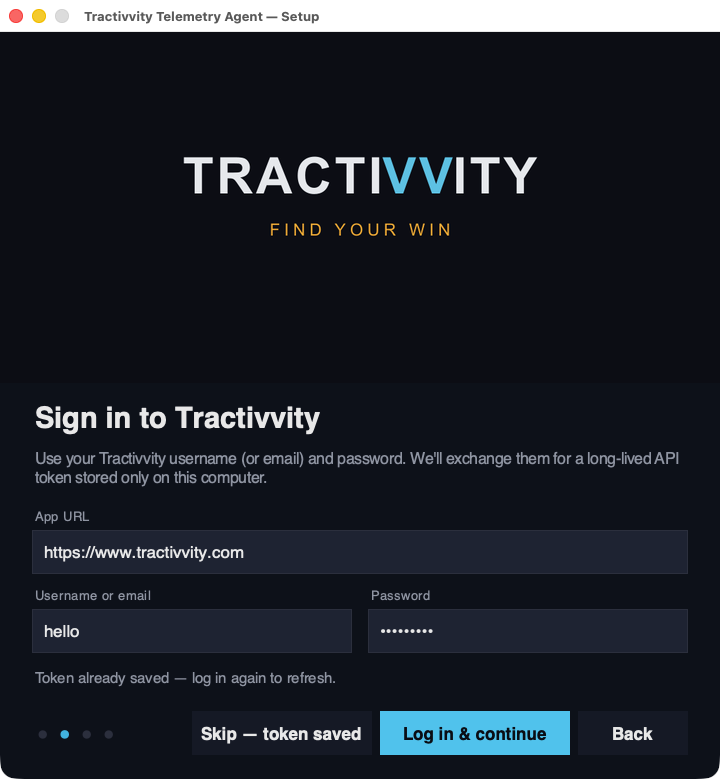
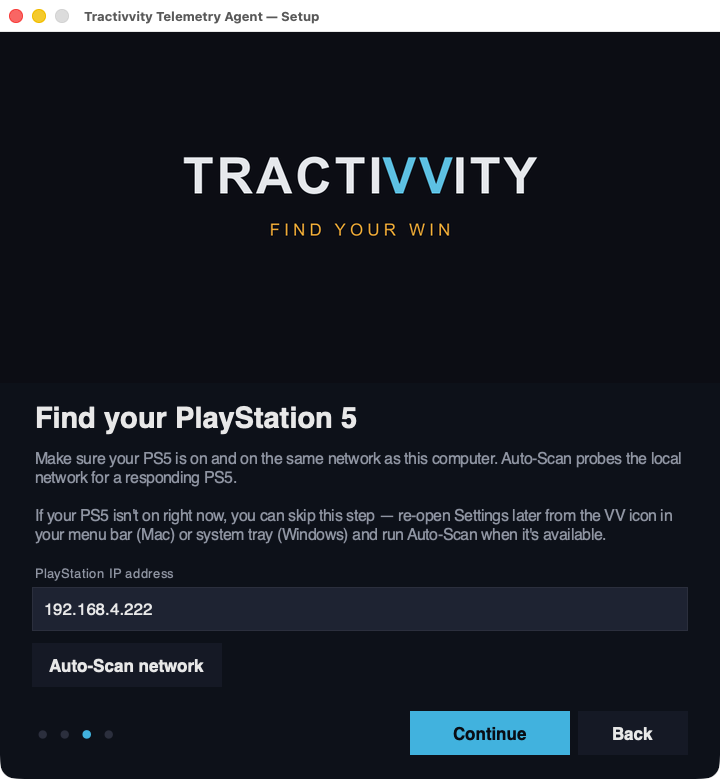
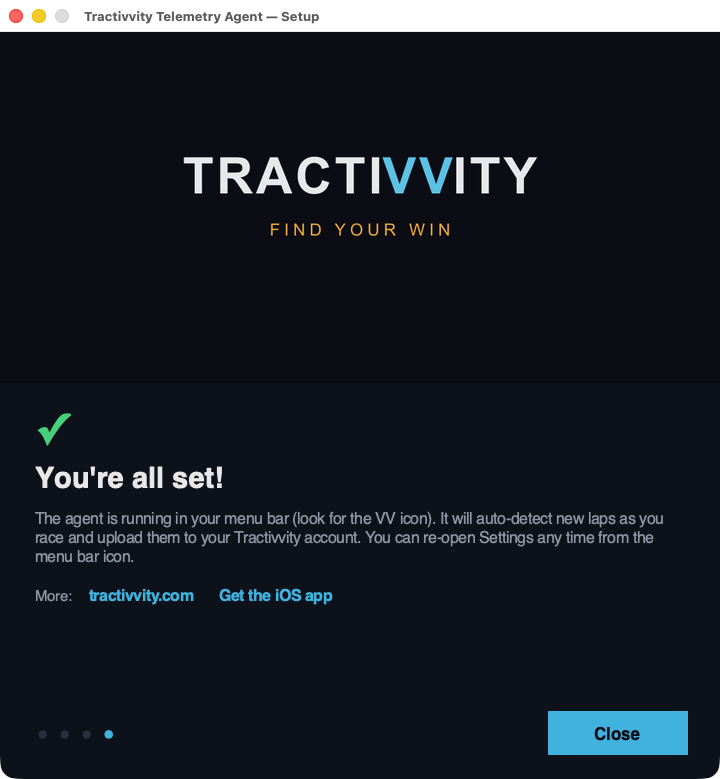
Installing the agent opens a four-step wizard, and it is the only time you will be asked to configure anything. It states its own job on the first screen: it listens to your PlayStation 5 over your local network and ships completed laps to your account.
Only two of the four screens ask anything of you. Sign in exchanges your username and password once for a long-lived token stored on that computer — reinstalling on a machine that already has one lets you skip straight past it. Find the console needs your PlayStation's address, and Auto-Scan network finds it for you, so in the normal case you press one button. If the console is off right now, skip the step and scan later from Settings.
What the agent lets you change
Everything the wizard set, plus the things it did not ask about, live behind Settings… in the menu-bar icon. It is one window.
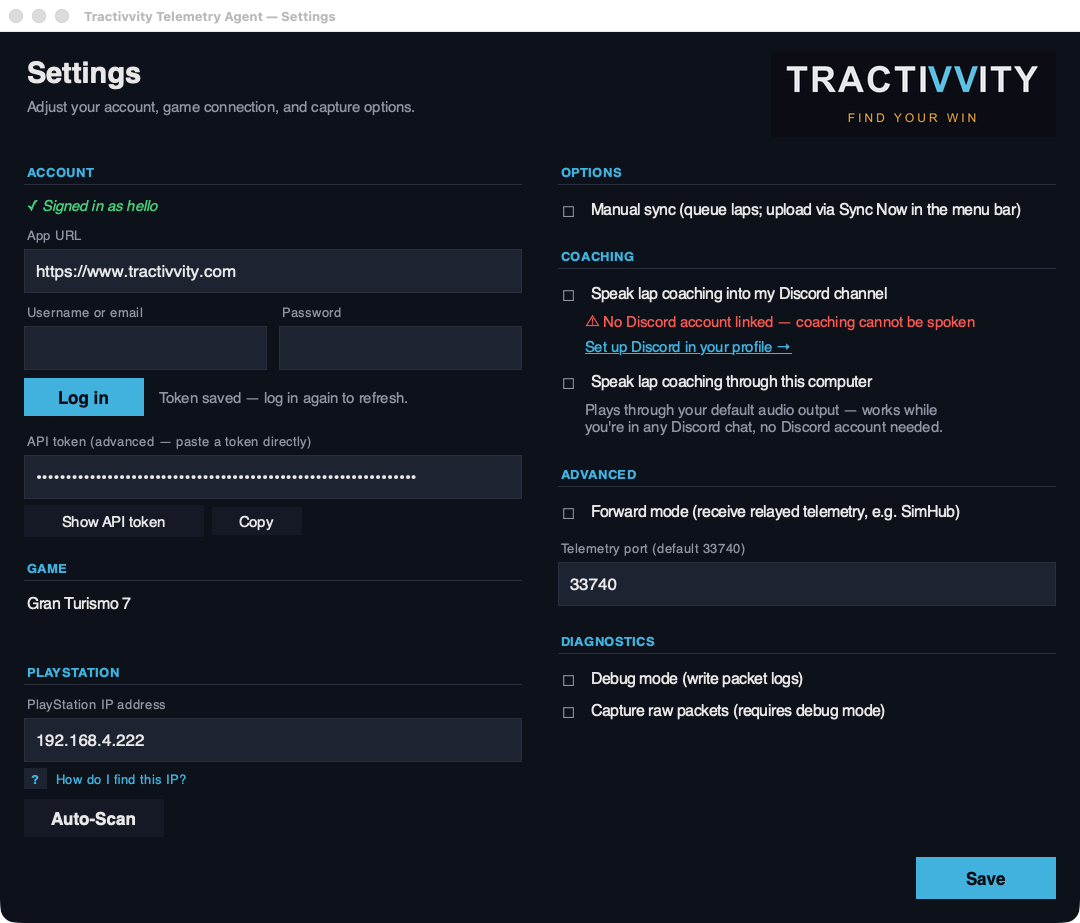
| Group | What it controls |
|---|---|
| Account | Who the laps upload as. Sign in with a username and password, or paste an API token directly if you would rather not type credentials into a desktop app. |
| Game | Which title the agent is listening for — Gran Turismo 7 here. |
| PlayStation | The console's address, with Auto-Scan to re-find it. Worth knowing this can change: a router handing out a new address is the usual reason an agent that worked yesterday stops seeing laps. |
| Options | Manual sync holds laps in a queue instead of uploading as you go, and you release them with Sync Now from the menu bar. For a session you would rather review before anything leaves the machine. |
| Coaching | Where the spoken coaching comes out — see below. |
| Advanced | Forward mode accepts relayed telemetry from something else on the network, such as SimHub, rather than reading the console directly. The telemetry port sits here too, defaulting to 33740. |
| Diagnostics | Packet logging and raw capture. Off unless somebody has asked you to turn them on. |
Where the agent's coaching is heard
This is the part of the agent that surprises people, because it is easy to assume a background capture process has no voice. It has two, and they are independent:
Your channel hears it too
Speaks your lap coaching into a Discord voice channel. Needs a linked Discord account — the setting says so plainly and links you to your profile if you have not done it.
Nothing to link
Plays through the machine's own audio output. No Discord account required, and it still works while you are sitting in someone else's Discord chat.
What the app lets you change
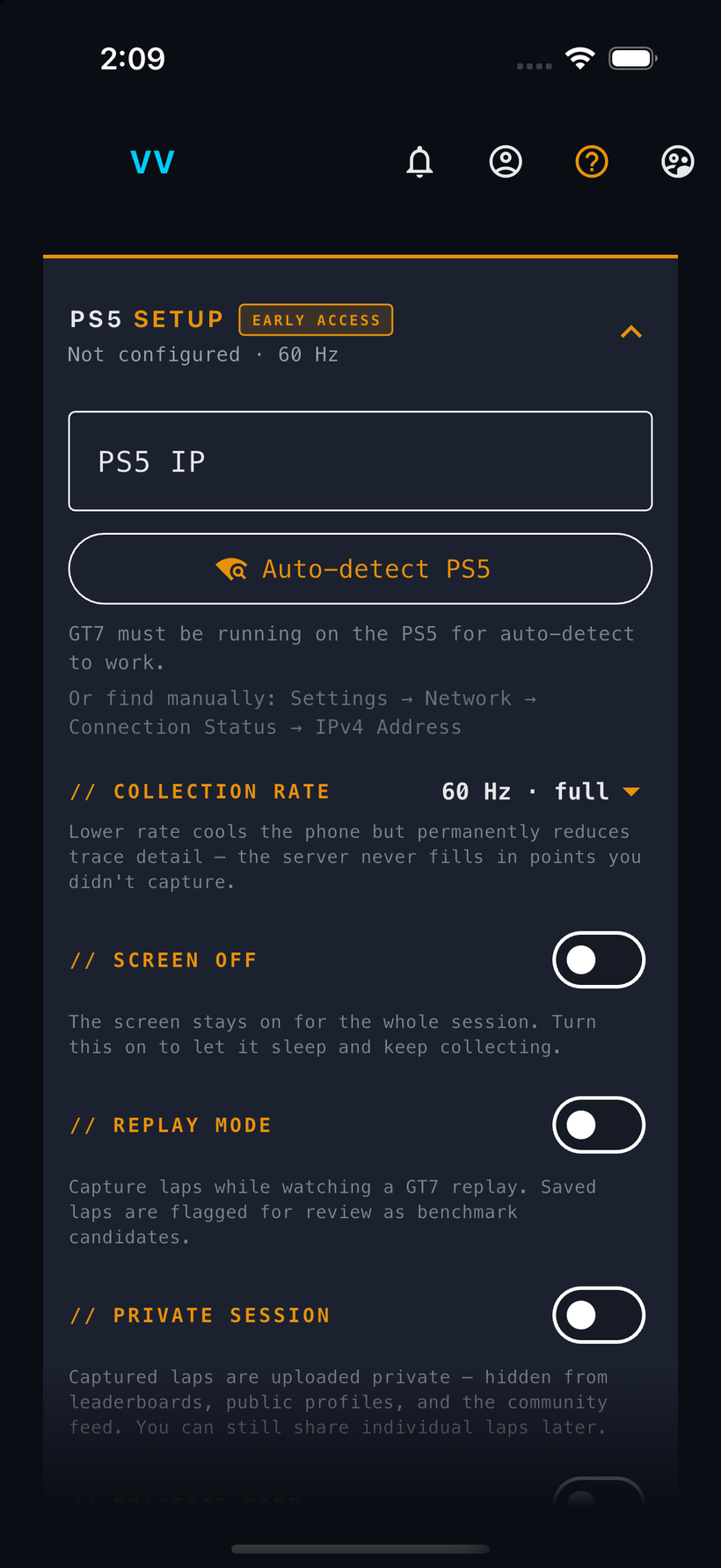
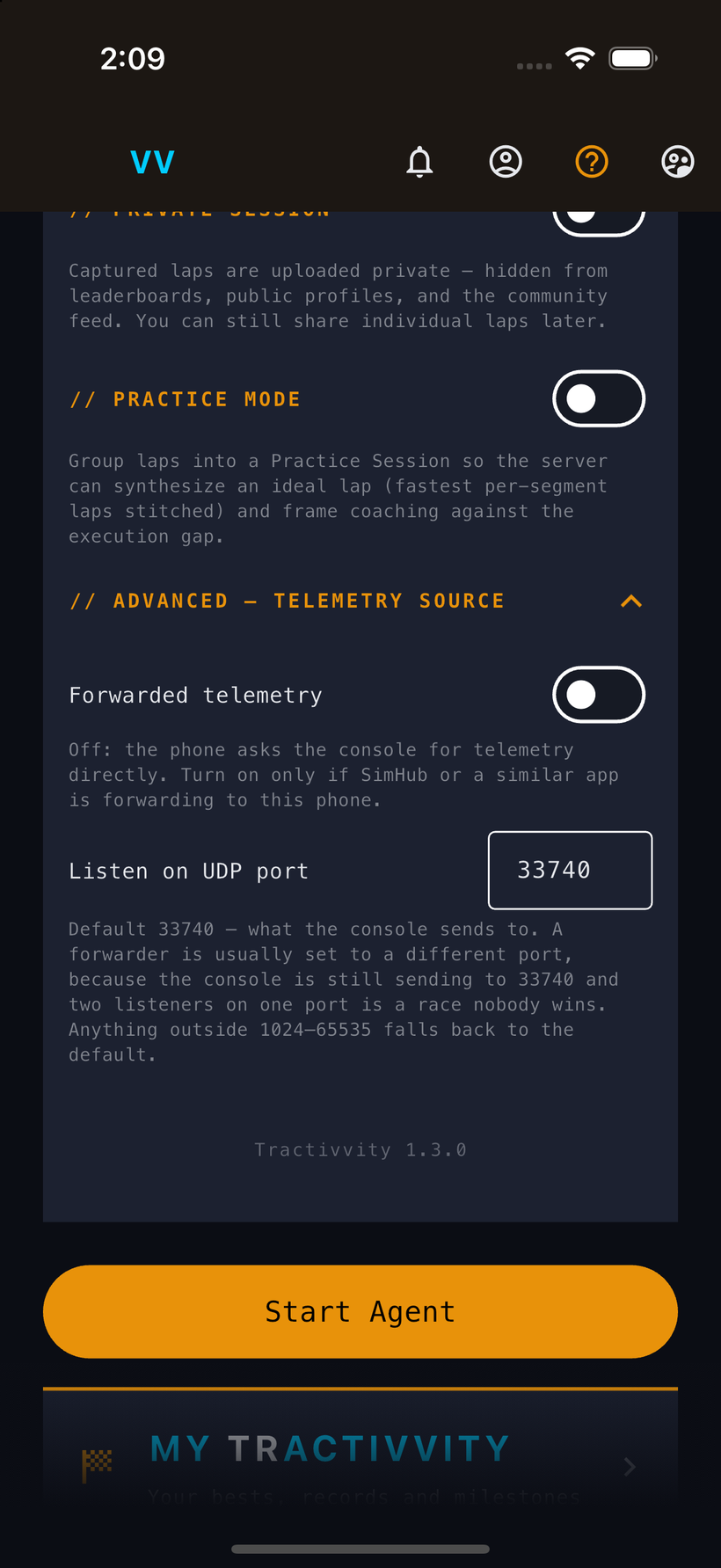
The phone's equivalent lives on its own setup screen, and it opens there on a fresh install. Same job as the agent — point it at the console, then decide how it behaves — but with a few decisions the desktop never has to make, because a phone has a battery and a screen that wants to sleep.
| Setting | What it decides |
|---|---|
| PS5 IP | Same job as the agent's, with Auto-detect PS5 doing the work. GT7 has to be running for auto-detect to find it; if it will not, the screen tells you where to read the address off the console — Settings › Network › Connection Status › IPv4 Address. |
| Collection rate | 60 Hz and full detail by default. Dropping it cools the phone at the cost of trace detail. Change it as often as you like — what will not change is the laps you already drove: a lap captured at a lower rate stays that way, because the server never fills in points that were not recorded. Turn it back up and everything from then on is full detail again. |
| Screen off | Normally the screen stays lit for the whole session. Turn this on to let the phone sleep and keep collecting anyway — and coaching keeps talking. That is not a happy accident: the only way an app can hold a socket open with the screen off is to run as audio, which this one legitimately is, because it speaks to you. |
| Replay mode | Capture a lap while you watch a GT7 replay rather than while driving. This is how you record your own benchmark laps — a reference to measure yourself against later, kept for you, not submitted anywhere. |
| Private session | Everything captured uploads private: out of leaderboards, off your public profile, absent from the community feed. You can still share any individual lap afterwards, so this is a floor rather than a lock. |
| Practice mode | Groups the session's laps so the server can stitch an ideal lap from your fastest segments and coach you against the gap between that and what you actually drove. Covered properly in its own section. |
| Forwarded telemetry | Off, the phone asks the console directly. On, it listens for a forwarder such as SimHub — the app's counterpart to the agent's Forward mode. |
| Listen on UDP port | 33740 by default, because that is what the console sends to. A forwarder is normally set to something else, since the console keeps sending on 33740 and two listeners on one port is, as the screen puts it, a race nobody wins. |
Every setting on both surfaces can be changed whenever you like, as often as you like. Collection rate is worth a thought all the same, because it is the one that affects the laps themselves: a lap keeps exactly the detail it was recorded with, because what is stored is what your car actually reported. The control is free to move; the laps you already drove are not. If you are unsure, leave it at 60 Hz.
What gets stored
When a lap lands, it does not get saved as a lap time. Sixty times a second, for the whole lap, Tractivvity writes down everything the game is telling it about the car — and the way it writes it down is the reason the rest of the product can exist.
The channels are not an abstract list. They are physically located on the car:
That lap stays that way. It does not get boiled down to a time and a summary once you have looked at it. Which means any question you ask about a lap later gets answered from the actual lap — including questions you never thought to ask on the day. Six months from now you can wonder whether you were locking the right-front into Turn 4, and the answer is sitting there, because the right-front wheel speed was written down sixty times a second and never thrown away.
The web portal, on a monitor
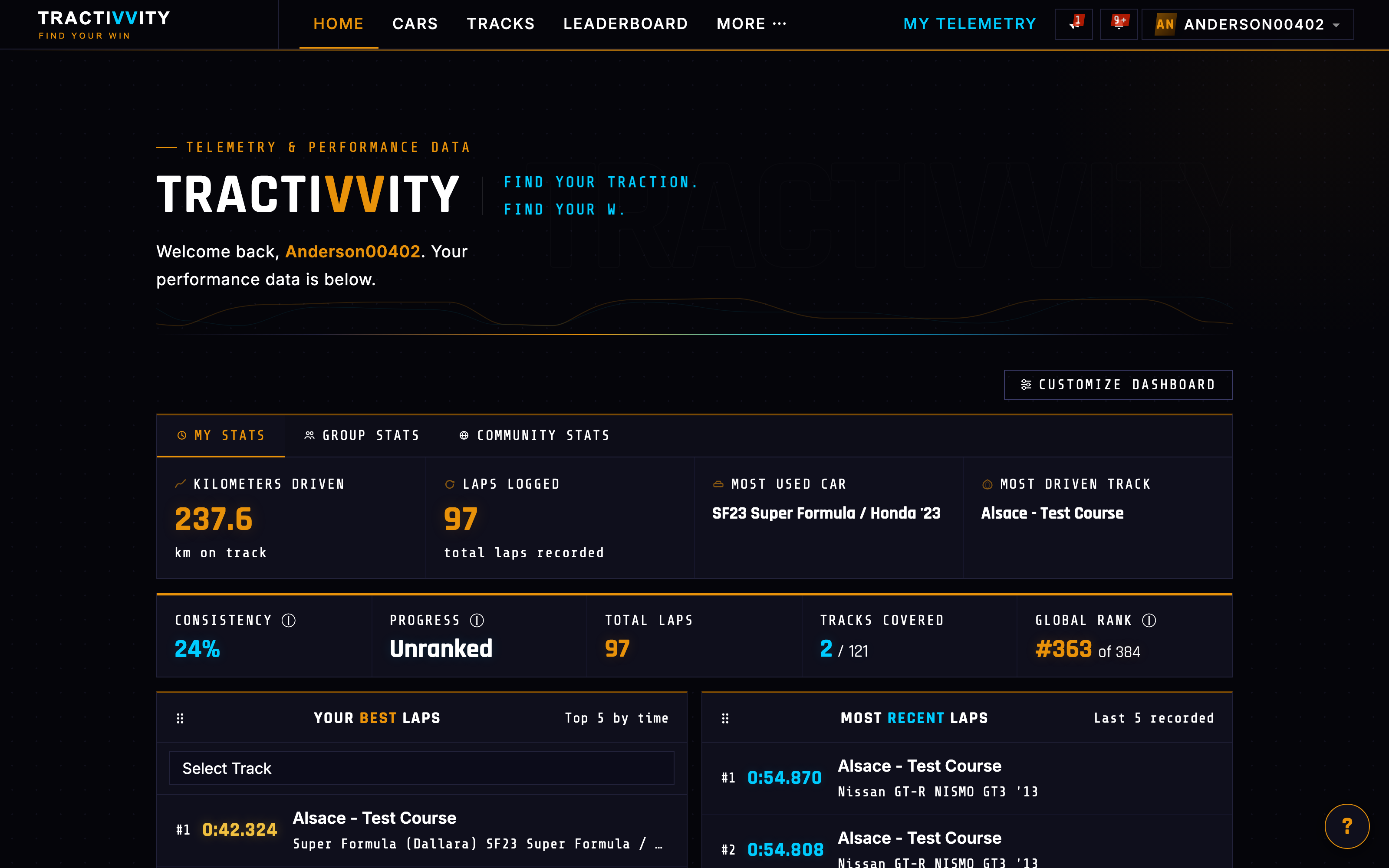
This is the surface the rest of this guide mostly shows, because it is where the detail lives and therefore where it photographs best. Some of what follows has no app equivalent at all. A good deal of it does — but the app is not a shrunken copy of these screens. It presents the same underlying data in its own form, designed for a phone in your hand rather than a monitor on a desk. So read the screenshots here as the portal's version of a feature, not as the only version.
What that unlocks
Everything else in this guide is a question asked of that same pile of laps — and the questions run in a circle. There is no finish line here: a session answers one of them and hands you the next one.
The coach reads your analysis, is what the habit rules feed, tells you what to work on next, speaks in your ear while you are driving it, and reads the result when you come back in. Every stage of this loop has a coaching layer sitting on it.
You do not win this and stop. A quick driver is one who has been round that circle more times than you have, on more corners, with better questions each lap — and the whole product is built to make going round it again cheap enough that you actually do.